Chapter 04: Basic structure
Estructura inicial del framework, Front Controller y separacion basica de responsabilidades para una aplicacion MVC.
{sample: true}
Chapter 04: Basic structure
Navigating the Internet, a simple search like “create MVC framework” yields thousands of results, not all of the same quality.
A very interesting article can be found here. However, these articles were written in 2009, and thus lack important features such as the use of namespaces, use of composer for autoloading, dependency injection, and so on.
In addition, it contains other problems typical of the years that have passed. Therefore, in many important respects, we will make fundamental changes.
First of all, we need to create a directory for our web server. We can call it anything. Throughout this entry we will consider that directory to have been called simplemvc.
Within it, we must create the following directory structure (Figure 26):
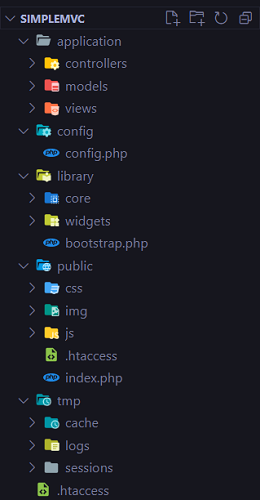
Let's briefly analyze each directory:
application: contains the code of the application that we are developing. Here we can see directories called controllers, models and views. Each controller, model, and view in this directory is specific to the particular project, and will extend a framework class that provides basic functionality. config: contains files with configuration data, such as environment constants, or connection to the database. library: contains the framework's own files. Within this directory we see two others: core and widgets. Within the first we will place the fundamental classes of the framework, and within the second some utility classes, such as widgets for creating tables, and others. public: This directory is meant to be the application's entry point directory. It is the one that is accessible to the public. tmp: Contains temporary files such as cache files, errors, and session information.
Starting to spin the wheel
Let's create a file called .htaccess (this is a special file used for configuration directives) and place it in the root of our project. That is, we will have a file called .htaccess at the same height as the directories mentioned above.
This file will be in charge of configuring our server to direct all requests to the public. The contents of the file are as follows:
<IfModule mod_rewrite.c>
	   RewriteEngine on
	   RewriteRule ^$ public/ [L]
	   RewriteRule (.*) public/$1 [L]
</IfModule>
NOTE: This is considered to be dealing with an Apache server. In case of using another environment, such as an IIS server, or Nginx, the necessary configuration must be carried out for each of them.
Inside the public directory, let's add the following content to the .htaccess file:
<IfModule mod_rewrite.c>
	RewriteEngine on

	RewriteCond %{REQUEST_FILENAME} !-f
	RewriteCond %{REQUEST_FILENAME} !-d

	RewriteRule ^(.*)$ index.php?url=$1 [PT,L]
</IfModule>
With it we are instructing our server to direct all requests (with the exception of files and directories) to a single entry point, the index.php file.
This file will receive as a url parameter, a route in the form controller/action. For example, if we write localhost/simplemvc/items/index, index.php will receive the value in the url variable 'items/index'.
This file is very simple and has the following content:
<?php

define('DS', DIRECTORY_SEPARATOR);
define('ROOT', dirname(dirname(__FILE__)));

if (!isset($_GET['url'])) $_GET['url'] = 'site/index';

$url = $_GET['url'];

require_once(ROOT. DS . 'library' . DS .'bootstrap.php');
The first two lines define two constants:
DS: This constant will refer to the directory separator, which can vary from one operating system to another. For example, it will take the value “\” or “/”. ROOT: It will refer to the root of the site. To do this, it uses the dirname function, which returns the parent directory of the route passed as a parameter. FILE is a PHP magic constant that represents the full path of the current file. Therefore, by using dirname(dirname(FILE)) we are moving up two levels from the location of the index.php file, effectively referencing the root of the application.
In the next line, we are creating a default route in case none is requested. All routes in our application will have the form (assuming we are in our local environment).
localhost/simplemvc/controller/action
If the controller/action is not indicated, the 'site/index' will be called by default, that is, the site controller and within it the index action.
In the next line we save the url (controller/action) received.
Finally, we include the bootstrap.php file located in the library directory.
Let's add the following code to bootstrap.php:
<?php
function autoload($class)
{
    $directories = [
        'library',
        'application'
    ];

    foreach ($directories as $directory)
    {
        $file = ROOT . DS. $directory . DS.
            str_replace('\\', '/', $class) . '.php';
        if (file_exists($file)) {
            require_once($file);
        }
    }
}

spl_autoload_register('autoload');

require_once(ROOT . DS . 'config' . DS . 'config.php');

$app = new core\Application();

$app->setReporting();
$app->removeMagicQuotes();
$app->run($url);
This file is a bit longer, and more complex. It starts by defining a function called autoload.
This function will be in charge of automatically loading the necessary classes to start our application.
What does that mean?
Well, suppose we have an application where we define classes A, B and C. Each of them is defined in their respective files: A.php, B.php and C.php.
In each file of our application where we want to use these classes, we must include the necessary files, for example:
require_once('library/A.php'); require_once('library/B.php');
As the number of classes increases, we can easily forget one of these statements.
One approach to avoid this problem is to take advantage of a php feature known as 'autoloading'.
PHP defines a default function called __autoload, which we can override to perform class loading. That is, if we implement an __autoload function, PHP will try to use this function to load undeclared classes.
However, according to the PHP documentation, the __autoload function has limitations that make it deprecated and may be removed in the future. One of these limitations is that __autoload only allows you to implement a single autoloader.
Alternatively – and this is the option we have chosen – we can write our own function (named whatever we want) and register it as an autoloader using the spl_autoload_register function.
Our function is called autoload. (Note the difference with the function name __autoload).
Our autoload function receives a $class parameter, which contains the name of a class that we intend to use in the code. Inside this function, we define an array that references a set of directories where we'll look for the necessary classes:
$directories = [
    'library',
    'application'
];
Next, we loop through this array with a foreach.
In this foreach we have the following line:
$file = ROOT . DS. $directory . DS.
    str_replace('\\', '/', $class) . '.php';
This line creates the path to the file where the referenced class is located.
For example, if we later write: $app = new Core\Application , the autoload function will receive as a parameter: 'core\Application'.
From it, the variable $file will end up containing (in the case of my environment) the string: C:\xampp\htdocs\simplemvc\library\core/Application.php
Then, if the file exists, it will be included with require_once($file).
Now, for the autoload function to be called every time a class is referenced, it must be registered as an autoloader. We do this with the statement:
spl_autoload_register('autoload');
Following that statement, we include the configuration file 'config.php'.
This file, located in the config, contains the following:
<?php
define('DEVELOPMENT_ENVIRONMENT', true);

const CONFIG = [
    'DB_SERVER' => 'localhost',
    'DB_USER' => 'root',
    'DB_PASSWORD' => '',
    'DB_DATABASE' => 'simplemvc'
];

define('SITE_BASE', 'http://localhost/simplemvc/');

define('APP_SESSION_ID', 'xeFLcX4gfj1h7WM6Yfrl');
A constant is defined that indicates that we are in the development phase, and then a constant, an array, with the data necessary for the connection with the database.
After that, we have a constant that points to the web root of our application. This is necessary if we have our app in another folder different from our root.
Finally, we have a constant to identify our session. We will use this when we are dealing with authentication or authorization. For now, I will just simply use a random string of 20 characters. Later, we’ll employ a method to ensure every session is unique.
Back in the bootstrap.php file, the last few lines are:
$app = new core\Application();

$app->setReporting();
$app->removeMagicQuotes();
$app->run($url);
These are the ones in charge of instantiating an Application object, and calling the necessary methods to start our application.
At this point I think it’s necessary to explain what we are trying to achieve. I would not dare to advise someone to start using a professional framework such as Yii, Laravel, Zend and others, without having a solid foundation of the language.
Why? Because if you don't have this foundation, the framework ends up becoming the language. We begin to think of EVERYTHING from the perspective of the particular framework that we use.
What does solid foundation mean?
Let's see:
- Variables
- Constants
- Data types
- Control structures
- String manipulation functions (very important)
- Arrays (very important!)
- Form processing
- File upload and manipulation
- Sessions and cookies
- Databases
- Manipulation de xml
- Ajax
Sounds like a lot, but it's not only necessary, it's worth it. There are many resources online to achieve this learning. For example, the w3schools tutorial covers these and other points.
Once mastered, it is a good idea to return to these references and practice exercises from time to time to "keep in shape".
After the basics, it is very important that we learn as much as possible about object-oriented programming. Classes, objects, namespaces, inheritance, interfaces, polymorphism, magic methods, traits, etc., must be part of our daily language.
Finally (yes, there is still more…but it is really the last thing) to take our skills to a new level, we must know and know how to apply DESIGN PATTERNS.
I highlight it, because design patterns allow building scalable and maintainable applications, two characteristics that facilitate the work of all project participants.
One of these design patterns is precisely the MVC pattern (Model, View, Controller) that we have talked about on several occasions.
As we already know, the MVC pattern seeks to separate the functionality of our application into three different components.
The model, in charge of implementing the business logic. It is in charge of reading and writing data to persistent storage.
The view, responsible for presenting the data to the user.
And the controller, in charge of delegating responsibilities to the model and the view in response to a user request.
Most frameworks use this pattern, but it's important to know that they might not. Things could be done differently.
Another design pattern is called the Front Controller.
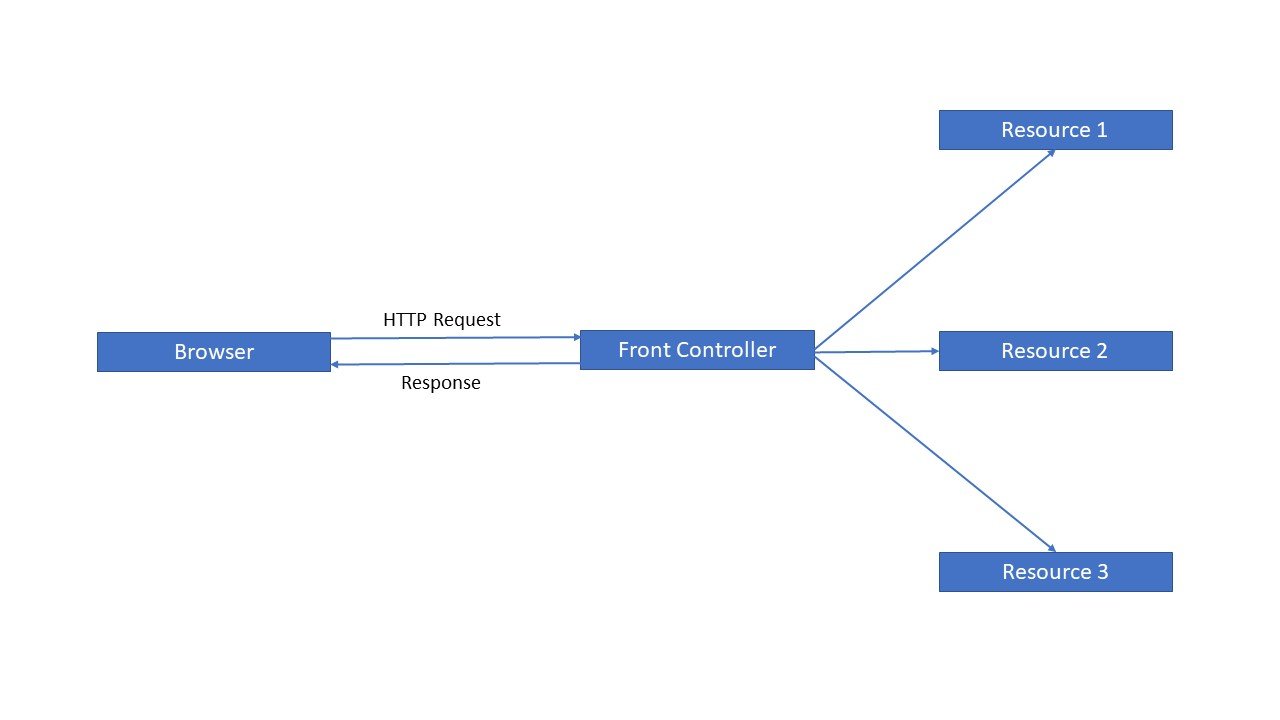
This design pattern consists of providing a single entry point to our application. That is, all the requests that arrive at the browser are directed to a single place from which they are derived to the appropriate component to handle them.
I think it is very important to point out that the MVC and the Front Controller are two different patterns that can be implemented independently.
It just so happens that they are frequently used together.
Again, most MVC frameworks, including Yii and Laravel, also use the Front Controller.
To clarify some doubts, let's see the following graph (Figure 27):
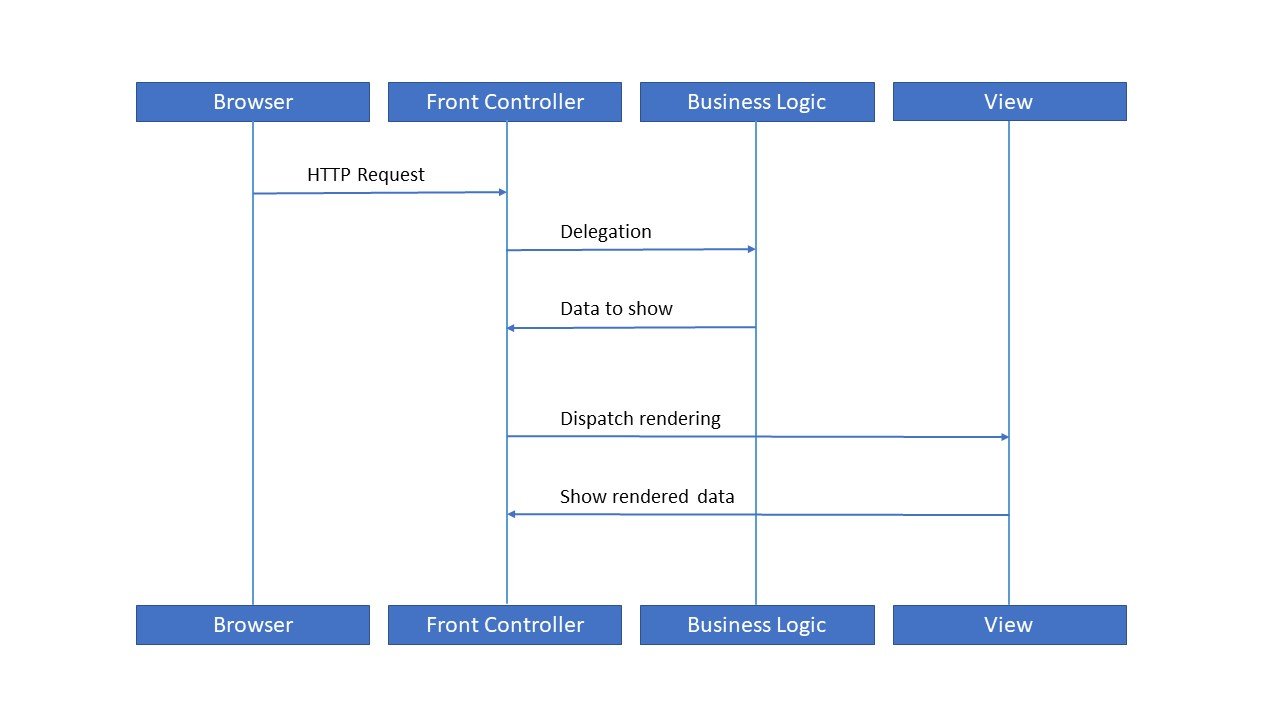
Here we see a diagram that represents the cycle of a request in a framework that uses the Front Controller and MVC patterns. The business logic is represented by the Model.
However, if we were to refer to the Front Controller alone, we could render it like this (Figure 28):
Sorry for the long exposition, I hope I haven't lost you guys yet. What I wanted to make clear is that design patterns are fundamental tools, and knowing them allows us to be better at our work.
I also wanted to emphasize that my concern lies in the fact that if one simply dedicates oneself to using a framework without taking the time to understand the language, one can be left with the impression that things work by some kind of “magic”.
Of course, frameworks precisely hide much of the complexity of their inner workings, accelerating development, but this concealment can lead to stagnation, a kind of "paralysis" when we see the need to extend or modify something. It would be extremely useful to have a clear idea of how a framework works, bringing out some of that “magic”.
Now, we'll turn to discussing the Application object, the heart of our application.
Structure
Let's remember the structure of our application, of which we previously explained the function of each directory (Figure 29).
The library, as we can see, has two directories called core and widgets. Inside the core directory are all the classes that make up the core of our framework. That is, those classes that are not specific to our application but will be present in each project that we carry out (Figure 30):
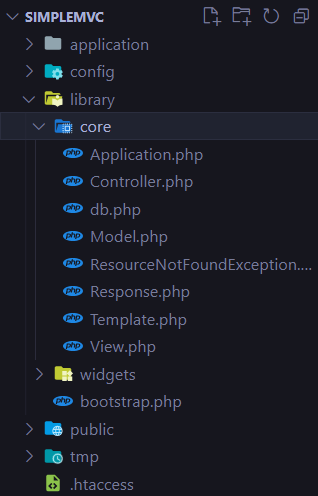
Go ahead and create the files, we can leave them empty for now.
Let's remember the contents of the bootstrap.php file:
function autoload($class)
{
    $directories = [
        'library',
        'application'
    ];

    foreach ($directories as $directory)
    {
        $file = ROOT . DS. $directory . DS.
            str_replace('\\', '/', $class) . '.php';
        if (file_exists($file)) {
            require_once($file);
        }
    }
}

spl_autoload_register('autoload');

require_once(ROOT . DS . 'config' . DS . 'config.php');

$app = newcore\Application();

$app->setReporting();
$app->removeMagicQuotes();
$app->run($url);
This file is in charge of instantiating the Application object, which in turn will be in charge of instantiating the appropriate controller and calling the correct method of said controller, according to the request received.
Let's look at the content of Application.php. It's not too long and we'll go through it piece by piece:
<?php
namespace core;

class Application {

  public function setReporting()
  {
    if (DEVELOPMENT_ENVIRONMENT) {
      error_reporting(E_ALL);
      ini_set('display_error', 'on');
    } else {
      error_reporting(E_ALL);
      ini_set('display_error', 'off');
      ini_set('error_log', ROOT . DS . 'tmp' .
        DS . 'logs' . DS . 'error.log');
    }
  }

  public function stripSlashesDeep($value)
  {
    (is_array($value)) ? array_map(
        [$this, 'stripSlashesDeep'], $value
    ) : stripslashes($value);
    return $value;
  }

  public function removeMagicQuotes()
  {
    $_GET = $this->stripSlashesDeep($_GET);
  }

  public function run($url)
  {
    $url = explode('/', $url);

    $controller = array_shift($url);
    $controllerClass = 'controllers\\'
      .ucwords($controller) . 'Controller';
    $action = array_shift($url);
    $queryString = $url;

    if (class_exists($controllerClass)) {
      $parents = class_parents($controllerClass);
      if (in_array('core\\Controller', $parents)) {
        if (method_exists($controllerClass, $action)) {
          $dispatch = new $controllerClass(
            $controller, $action
          );
          call_user_func_array(
            [$dispatch, $action], $queryString
          );
        } else {
          die("Bad action");
        }
      } else {
        die("Bad Controller");
      }
    } else {
      die("Bad Controller");
    }
  }

}
In the first line we identify the namespace to which our class belongs:
namespace core;
In a simplified way, we can think of a namespace as a way of grouping classes. Thus, our core namespace groups together the Application, Controller, db, Model, and Template classes.
Two classes with the same name cannot exist in the same namespace, but they can exist in different namespaces.
After identifying the namespace to which the class corresponds, we have its definition:
class Application {
Then we find the first method of our class:
public function setReporting()
{
    if (DEVELOPMENT_ENVIRONMENT) {
        error_reporting(E_ALL );
        ini_set('display_error', 'on');
    } else {
        error_reporting(E_ALL);
        ini_set('display_error', 'off');
        ini_set('error_log', ROOT . DS . 'tmp' .
            DS . 'logs' . DS . 'error.log');
    }
}
The purpose of this method is establishing the way in which the errors of our application will be registered, according to the value of the DEVELOPMENT_ENVIRONMENT variable, which, as we remember, is defined in the config.php file.
If the value of this constant is true, then we do two things: We
set the error reporting level to E_ALL. That is, all types of errors will be reported.
By setting display_errors to on, we are indicating that we want all errors to be displayed as part of the screen output. This is very useful in the development phase when we are debugging bugs.
Conversely, if DEVELOPMENT_ENVIRONMENT is false, then display_errors will be set to off, hiding error messages from the user. However, it is important to be able to parse such errors, so we add a new line:
ini_set('error_log', ROOT . DS . 'tmp' . DS .
    'logs' . DS . 'error.log');
With it, we are indicating in which file the errors that occur at runtime will be dumped, for later analysis.
Next we have a very short method:
public function stripSlashesDeep($value)
{
    (is_array($value))
        ? array_map([$this, 'stripSlashesDeep'], $value)
        : stripslashes($value);
    return $value;
}
This method receives a parameter, which can be an array or a single element. In the case that it is a vector, we make use of the array_map function. This function receives two parameters: a function to be applied, and an element on which to apply it.
Note that the function to be applied is stripSlashesDeep itself. That is, we have a recursive call. Also notice that the first parameter passed to array_map has the form:
[$this, 'stripSlashesDeep']
This is because we are calling a function that is a method of a class, so we must use “$this”. $this is a pointer that represents, at run time, the calling object. Next, we have the name of the function.
As the second parameter of array_map, we have the value (which we already established to be an array) $value.
In short, array_map receives two parameters: a function and an array. And I return an array as a result, where the function indicated in the first parameter has been applied to each of the elements.
On the other hand, if $value is not an array but a single value, the stripslashes function is applied to that value. This function removes character escape slashes in strings:
For example, if we have the string O'Brian, after stripslashes we will have the string O'Brian.
The following method:
public function removeMagicQuotes()
{
    $_GET = $this->stripSlashesDeep($_GET);
}
Simply call stripSlashesDeep method for requests received via $_GET. We won’t be doing it for $_POST because this could give us an empty $_POST array, or $_COOKIE because later we will use cookies to implement the Remember me functionality.
Finally we have the run method:
public function run($url)
{
    $url = explode('/', $url);

    $controller = array_shift($url);
    $controllerClass = 'controllers\\'
        .ucwords($controller) . 'Controller';
    $action = array_shift($url);
    $queryString = $url;

    if (class_exists($controllerClass)) {
      $parents = class_parents($controllerClass);
      if (in_array('core\\Controller', $parents)) {
        if (method_exists($controllerClass, $action)) {
          $dispatch = new $controllerClass(
                $controller, $action);
            call_user_func_array(
                [$dispatch, $action], $queryString);
          } else {
            die("Bad action");
          }
        } else {
            die("Bad Controller");
      }
    } else {
        die("Bad Controller");
    }
}
Let's analyze it carefully:
This method receives as a parameter the url that the user has requested, for example, given our application called simplemvc, when entering in the browser:
localhost/simplemvc/items/index, the received parameter ($url), it will have the value “items/index”.
Then we have the following statements:
$url = explode('/', $url);

$controller = array_shift($url);
$controllerClass = 'controllers\\'
    .ucwords($controller) . 'Controller';
$action = array_shift($url);
$queryString = $url;
Using the explode function, we convert the received string into a vector. Following the example, if $url has the value “items/index”, then we will have the following vector:
$url[0] = “items” $url[1] = “index”
Then we have $controller = array_shift($url) ;
The array_shift function returns the first element of an array, and removes it from the array. Following the example, in $controller we will have saved “items”.
Then we have:
$controllerClass = 'controllers\\'
    .ucwords($controller) . 'Controller';
What we do here is get the name of the class that represents the desired controller. We know that requests arrive in the form “controller/action”. From the indicated controller, we must obtain the name of the class that corresponds to the controller.
Following the example, $controllerClass will contain the value “controllers\ItemsController”, which corresponds to the name of the class including its namespace (controllers).
Note the use of the ucwords function, which converts the first character of each word in a string to uppercase. In this case “items” becomes “Items”.
Let's continue:
$action = array_shift($url);
$queryString = $url;
Now we get the name of the action, in our example, “index”. Recall that array_shift takes and extracts the first element of an array.
At the beginning we had the array: [“items”, “index”]. After the first call to array_shift we will have: ["index"]. After the second call we will have an empty array.
Finally, $queryString will contain…an empty string? Yes, in this case. But suppose that instead of “items/index” we would have received “items/edit/1” as a request. In this case, we would have:
$controller = “items” $controllerClass = “controllers\ItemsController” $action = “edit” $queryString = 1
Let's continue:
if (class_exists($controllerClass)) {
    ...
} else {
    die(" BadController");
}
In the outermost if we check if the requested class (the controller) exists. Otherwise we finish the execution of the script showing a message.
In case the class exists, we have the following line:
$parents = class_parents($controllerClass);
The class_parents function returns an array containing the names of all classes that are ancestors of the class passed as a parameter.
What does this mean?
Suppose we have a class “A”. Then we have a class “B” that inherits from “A”. Finally we have a class “C” that inherits from “B”.
class_parents("C") will return the following array: ["A", "B"].
Next we evaluate another condition:
if (in_array('core\\Controller', $parents)) {
    ...
} else {
    die("Bad Controller");
}
What we are looking for is to see if in the $parents array, which contains the ancestor classes of $controllerClass, the class “core\Controller” is present.
This means that each controller in our application must extend from the base class “Controller”. We have already seen this many times in Yii, where we have for example a controller class “Client” defined in this way:
class ClientController extends Controller
If the class does not extend “Controller”, then we interrupt the execution of the script with an error message.
If it’s a class extending from “Controller”, we have the last if:
if (method_exists($controllerClass, $action)) {
    $dispatch = new $controllerClass(
        $controller, $action);
    call_user_func_array(
        [$dispatch, $action], $queryString);
} else {
    die("Bad action");
}
What we do here is use the method_exists function. Such a function determines whether a given method is present in a given class.
We make sure that the requested action is a method of the desired controller. If this is not the case, we terminate the execution with an error.
If it is present, then we instantiate a new object of the desired controller class. In this case ItemsController.
The call_user_func_array function receives two parameters. The first is an array, where the first element corresponds to the instantiated controller object, and the second to the method that should be called for that controller. The second parameter corresponds to the value that said method will receive as a parameter.
This may sound confusing, but what it means is the following:
From the "items/index" request, the "index" method of "ItemsController" will be called. In that case the index method will receive an empty parameter.
If the request had been “items/edit/1”, then the edit method of ItemsController would have been called, and the method in question would receive the value 1 as a parameter.
Of course, using die to show a message and end the execution is far from an elegant solution, in fact, is not a solution at all, but we’ll take care of that later.
We are closer to the first functional version of our framework. In the next chapter, we’ll be working on the database connection class.