Chapter 06: Model, View, Controller
Desarrollo de los componentes centrales del patron MVC dentro del framework propio.
{sample: true}
Chapter 06: Model, View, Controller
As we said in the last chapter, we will start working on the Model, View and Controller classes. We have already discussed that the library folder contains the classes that build our framework.
Inside that folder, we have two other directories, core and widgets. The core folder, as its name suggests, contains the core classes. Our Model, View and Controller classes will provide the basic functionality, the common behavior that the derived classes - the models, views and controllers of every particular project - will follow.
But first, let’s do some cleanup on our Application class.
In our run function, we have this piece of code:
if (class_exists($controllerClass)) {
  $parents = class_parents($controllerClass);
  if (in_array('core\\Controller', $parents)) {
    if (method_exists($controllerClass, $action)) {
      $dispatch = new $controllerClass(
        $controller, $action
      );
      call_user_func_array(
        [$dispatch, $action], $queryString
      );
    } else {
      die("Bad action");
    }
  } else {
    die("Bad Controller");
  }
} else {
  die("Bad Controller");
}
We really need to get rid of those die statements. If you don’t have it already, create a file named ResourceNotFoundException.php in the core folder with the following content:
<?php
namespace core;

class ResourceNotFoundException extends \Exception
{
    public function __construct(
        $message, $code = 0, \Exception $previous = null
    )
    {
        parent::__construct($message, $code, $previous);
    }
}
It’s a very simple class, extending from the Exception class. Note the use of the slash \ at the beginning of the name of the class we are extending. This is necessary because we are in the namespace core, so every reference to a class will be interpreted as a class residing in that namespace.
We have our constructor, which simply invokes the parent constructor. At this point you might be wondering why have a constructor whose only purpose is to implement the parent’s constructor. But it’s a good practice, and we could easily add new functionality.
Let’s add another file named Response.php in the core folder with the following content:
<?php
namespace core;

class Response {
  public function setResponseHeader($code, $title)
  {
    header("HTTP/1.0 $code $title");
    echo "<h1>404 Not found</h1>";
    echo "The page that you have requested could
      not be found.";
    exit();
  }
}
We have an only function, setResponseHeader. This function will set a header with the code indicated in the first parameter. At this point, we will only use this function to display 404 errors, but we could easily extend it to include all 4xx errors.
For a complete list of http status codes you can visit this link.
Now we can rewrite our run function as follows:
public function run($url)
{
  $url = explode('/', $url);
  $controller = array_shift($url);
  $controllerClass = 'controllers\\'
    . ucwords($controller) . 'Controller';
  $action = array_shift($url);
  $queryString = $url;

  try {
    if (class_exists($controllerClass)) {
      $parents = class_parents($controllerClass);

      if (in_array('core\\Controller', $parents)) {
        if (method_exists($controllerClass, $action)) {
          $dispatch = new $controllerClass(
            $controllerClass, $action
          );
          call_user_func_array(
            [$dispatch, $action], $queryString
          );
        } else {
          // Bad action
          throw new ResourceNotFoundException(
            'Not found', 404
          );
        }
      } else {
        // Bad controller
        throw new ResourceNotFoundException(
          'Not found', 404
        );
      }
    } else {
      // Bad controller
      throw new ResourceNotFoundException(
        'Not found', 404
      );
    }
  } catch (ResourceNotFoundException $e) {
    $response = new Response();
    $response->setResponseHeader(404, 'Not found');
  }
}
Instead of spitting a message we throw an exception of type ResourceNotFoundException. The exception is captured by our catch sentence, and then an adequate response is shown.
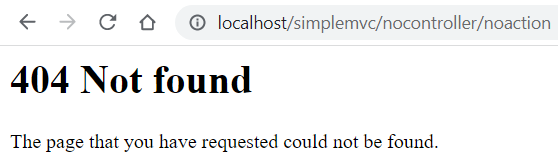
At this point, you might be tempted to execute the application. Go ahead, open the browser and type http://localhost/simplemvc/nocontroller/noaction. You should see something like this (Figure 31):
Before we continue, let’s make a small change. It is not mandatory, but convenient. Right now, our config.php file has the SITE_BASE constant defined as:
define('SITE_BASE', 'http://localhost/simplemvc/');
We’ll use a virtual host, something that we already saw in previous chapters. Change the line to:
define('SITE_BASE', 'http://simplemvc.test/');
Now open the httpd-vhosts.conf file and add these lines:
<VirtualHost *:80>
    DocumentRoot "C:/xampp/htdocs/simplemvc/public"
    ServerName simplemvc.test
</VirtualHost>
The final step is change the hosts file to include this line:
127.0.0.1 simplemvc.test
You can choose to skip these steps, it will only affect the address that you must type in the browser. With these changes we can simply use simplemvc.test, which is shorter.
Now we can concentrate on the main purpose of this chapter. Since chapter 05 dealt with the database class, it is a good idea to continue the Model class.
<?php
namespace core;

class Model {
  protected $table;
  protected $db;
  protected $key;
  private $data;

  public function __construct($table)
  {
    $this->table = $table;
    $this->db = new db(CONFIG);
  }

  public function all($arrFields = [])
  {
    return $this->db->getAll($this->table, $arrFields);
  }

  private function find($id, $arrFields = [])
  {
    return
      $this->db->getOne(
        $this->table, $arrFields, 'id', $id
      );
  }

  public function load($data)
  {
    foreach ($data as $key => $value) {
      $this->data[$key] = $this->$key = $value;
    }
  }

  public function loadModel($id)
  {
    $result = $this->find($id, []);

    if ($result) {
      $this->load($result);

      return $this;
    }
    return false;
  }

  public function save($id = null)
  {
    if ($id) {
     $result =
      $this->db->update(
        $this->data, $this->table, $this->key, $id
      );
    } else {
     $result =
      $this->db->insert($this->data, $this->table);
    }

    return $result;
  }

  public function del($key, $value)
  {
    return $this->db->delete($this->table, $key, $value);
  }

  public function __set($name, $value)
  {
    if (method_exists($this, 'set' . ucfirst($name))) {
      $method = 'set' . ucfirst($name);
      return $this->$method($value);
    }

    return $this->$name = $value;
  }

  public function __get($name)
  {
    if (method_exists($this, 'get' . ucfirst($name))) {
      $method = 'get' . ucfirst($name);
      return $this->$method();
    }

    return $this->$name;
  }
}
This is the whole class, only 80 lines of code in my editor.
Let’s go through it.
protected $table;
protected $db;
protected $key;
private $data;
The $table property will simply hold the name of the database table the model will be attached to. In our framework, we’ll have a one to one correspondence between models and tables. This is a fairly simple but effective way to organize our projects. Of course, we will have to account for the relationships between tables, but for now we can work with what we have.
Then we have a property to hold an instance of our database class. $key will hold the name of the table field that identifies a record, normally id.
Finally, $data will be used to hold an associative array of properties values. We don’t need to reference $data from the project’s models, so we declare it as private.
On with the methods.
public function __construct($table)
{
    $this->table = $table;
    $this->db = new db(CONFIG);
}
The constructor is very simple. It takes the table name as a parameter, and creates an instance of the database class.
public function all($arrFields = [])
{
  return $this->db->getAll($this->table, $arrFields);
}

private function find($id, $arrFields = [])
{
  return $this->db->getOne(
    $this->table, $arrFields, 'id', $id
  );
}
These two methods are very similar. Just one line of code each, getting all or one record from the table.
Now, before we get to the rest of the methods, it’s convenient to focus on the implementation of two magic methods, __set and __get:
public function __set($name, $value)
{
    if (method_exists($this, 'set' . ucfirst($name))) {
        $method = 'set' . ucfirst($name);
        return $this->$method($value);
    }

    return $this->$name = $value;
}

public function __get($name)
{
    if (method_exists($this, 'get' . ucfirst($name))) {
        $method = 'get' . ucfirst($name);
        return $this->$method();
    }

    return $this->$name;
}
We already saw these methods in previous chapters. We used them in the Post class of the blog example. Now, we are extracting them to the Model class, from which every model in our application will inherit.
We have the base Model class in place, and it is time to move to the base Controller class.
Change the content of the Controller.php file like this:
<?php
namespace core;

class Controller
{
    private $model;

    public function __construct()
    {

    }

    public function index()
    {

    }
}
Very simple, the methods are not implemented, but it is a necessary skeleton to our application.
Now, the final piece is the View component. Change the content of the View.php file as follows:
<?php
namespace core;

class View {
  private $controller = '';
  private $action = '';
  private $variables = [];

  public function __construct($controller)
  {
    $this->controller = $controller;
  }

  public function setAction($action)
  {
    $this->action = $action;
  }

  public function set($name, $value)
  {
    $this->variables[$name] = $value;
  }

  public function render($main = true, $scripts = '')
  {
    extract($this->variables);
    include ROOT . DS . 'application'. DS . 'views'
     . DS . $this->controller . DS . $this->action
     . '.php';
  }
}
Now, this class serves as the foundation for the views of our application.
If the user is visiting the url http://simplemvc.test/client/index, for example, we already know that a ClientController should be in place, with an index method. In some part of that method, there will present some lines like these:
$this->view->setAction('index');

$this->view->set('data', $data);

$this->view->render();
We set the action to index, and that means that the view will try to include a file called index.php located in a client folder. In fact it will look for c:/xampp/htdocs/simplemvc.test/application/views/index.php
Let’s go back to index.php located in the public directory. It has the following content:
<?php
define('DS', DIRECTORY_SEPARATOR);
define('ROOT', dirname(dirname(__FILE__)));

if (!isset($_GET['url'])) $_GET['url'] = 'site/index';

$url = $_GET['url'];

require_once(ROOT . DS . 'library' . DS
    . 'bootstrap.php');
So, if there is no query string with the controller and action, it will default to site/index. That is, it will look for a SiteController class, and a method called index. Following the convention, this method will render a view file called index.php
Summary
In this chapter we have laid the foundations of our framework. It may not seem like much yet, but it has given us a clean folder structure and a set of extensible classes to build increasingly complex applications.
In the next chapter, we’ll build one simple example application to show how to extend from the core classes presented here.
See you soon!