Chapter 08: Authentication
Implementacion de autenticacion: usuarios, sesiones, registro, login, logout y proteccion basica de acceso.
Introduction
In this chapter we will focus our attention on a fundamental characteristic of an application: authentication. It is inconceivable to think about an application that doesn’t require registration and login functionalities, and as so, it’s probablya good idea for our framework to provide those features out of the box.
Users table
We’ll start by creating a users table. We don’t need many fields. Use this sql sentence to create the table:
CREATE TABLE `simplemvc`.`users` (
`id` INT(11) NOT NULL AUTO_INCREMENT ,
`username` VARCHAR(30) NOT NULL ,
`password` VARCHAR(255) NOT NULL ,
`email` VARCHAR(100) NOT NULL ,
`confirmed_at` DATETIME NULL ,
PRIMARY KEY (`id`)
) ENGINE = InnoDB;
Generating a unique session id
At this moment, we have this line in our config.php:
define('APP_SESSION_ID', 'xeFLcX4gfj1h7WM6Yfrl');
We are using some random string to identify the session, but we need to ensure that every session is unique for every user. We’ll be using a helper class to accomplish this.
Create a folder called helpers inside the config directory. Then, inside helpers, add a file IP.php with the following content:
<?php
namespace helpers;

class IP {
  public static function getRealIP() {
      $ip = isset($_SERVER['HTTP_CLIENT_IP'])
          ? $_SERVER['HTTP_CLIENT_IP']
          : (isset($_SERVER['HTTP_X_FORWARDED_FOR'])
              ? $_SERVER['HTTP_X_FORWARDED_FOR']
              : $_SERVER['REMOTE_ADDR']);

      return $ip;
  }
}
The class has only one static method.
Now we can rewrite the config.php as follows:
<?php
define('DEVELOPMENT_ENVIRONMENT', true);

const CONFIG = [
    'DB_SERVER' => 'localhost',
    'DB_USER' => 'root',
    'DB_PASSWORD' => '',
    'DB_DATABASE' => 'simplemvc'
];

define('SITE_BASE', 'http://simplemvc.test/');

use  helpers\IP as IP;

$sess_id = md5(IP::getRealIP());

define('APP_SESSION_ID', $sess_id);
User model
Now we need to create a User model. It’s very similar to what we did with the Cliente model. Create a file called User.php inside the models folder with the following content:
<?php
namespace models;

use core\Model as Model;

class User extends Model {
    private $username;
    private $email;
    private $password;

    public function setUserName(String $username)
    {
        $this->username = $username;
    }

    public function getUserName()
    {
        return $this->username;
    }

    public function setEmail(String $email)
    {
        $this->email = $email;
    }

    public function getEmail()
    {
        return $this->email;
    }

    public function setPassword($password)
    {
        $this->password;
    }

    public function getPassword()
    {
        return $this->password;
    }
}
Nothing new here. We can go on to the controller and views.
UserController: registering a new user
Create a new UserController with the following content:
<?php
namespace controllers;

use core\Controller as Controller;
use models\User as User;
use core\View as View;

class UserController extends Controller {
  private $user;
  private $view;
  private $db;

  public function __construct()
  {
      $this->user = new User('users');
      $this->view = new View('users');
  }

  public function register()
  {
      if ($_SERVER["REQUEST_METHOD"] == 'POST') {
          $data = [
              'username' => $_POST["username"],
              'password' =>
password_hash($_POST["password"], PASSWORD_BCRYPT),
              'email' => $_POST["email"]
          ];

          $this->user->load($data);
          $this->user->save();

          header('Location: ' . SITE_BASE
            . 'site/index/');
          exit;
      }

      $this->view->setAction('register');
      $this->view->set('user', $this->user);
      $this->view->render();
  }
}
We’ll be calling the register method to add a new user. The only thing worth to note is this line:
'password' =>
    password_hash($_POST["password"], PASSWORD_BCRYPT)
We are hashing the password before storing it. This function has two parameters: the string representing the password, and the second is the algorithm to be used. PASSWORD_BCRYPT generates a 60 character string.
Register view
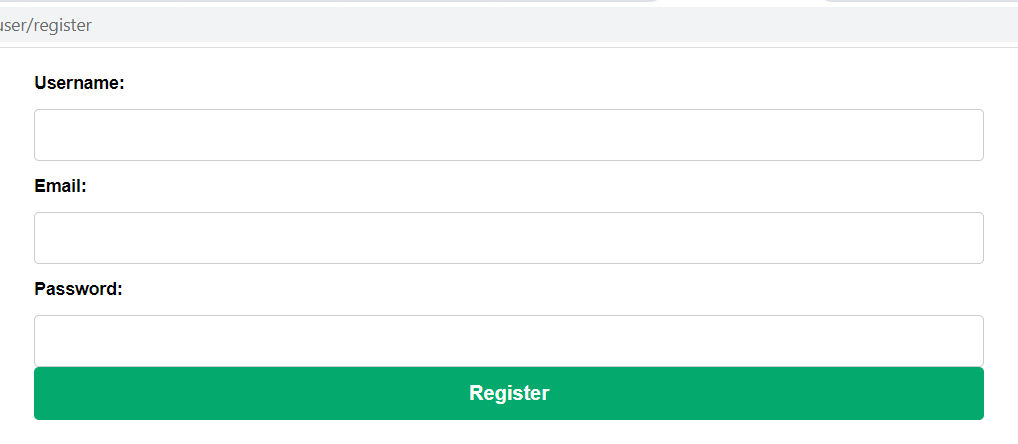
Now we need to add a folder called users inside the views folder. Then add a file called register.php with the following content:
<div style="display: flex; justify-content: center">
  <form action="<?= SITE_BASE ?>user/register"
    method="POST">
      <div>
          <label for="username">Username:</label>
          <input type="text" name="username"
            value="<?= $user->username ?>">
      </div>
      <div>
          <label for="email">Email:</label>
          <input type="text" name="email"
            value="<?= $user->email ?>">
      </div>
      <div>
          <label for="password">Password:</label>
          <input type="password" name="password" value="">
      </div>
      <button type="submit">Register</button>
  </form>
</div>
If you go to http://simplemvc.test/user/register we should see the following (Figure 42):
Go ahead and try to register. You should get a Not Found error (Figure 43):
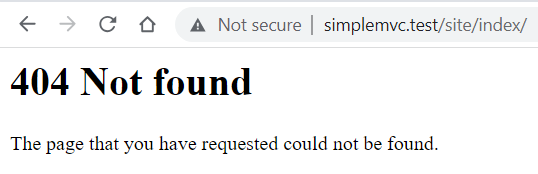
This is natural, because we are redirecting to site/index, and we don’t have and SiteController or an index view.
Let’s create a SiteController.php with the following content:
<?php
namespace controllers;

use core\Controller as Controller;
use core\View as View;

class SiteController extends Controller {
    private $view;

    public function __construct()
    {
        $this->view = new View('site');
    }


    public function index()
    {
        $this->view->setAction('index');
        $this->view->render();
    }
}
Then add the site folder inside the views directory. And then a file called index.php, with this single line:
<h1>Welcome</h1>
UserController: login in
We can focus on login in. First at the following line to the UserController:
use core\db as db;
Then add the following method to the UserController:
public function login()
{
  session_id(APP_SESSION_ID);
  session_start();

  if (isset($_SESSION["username"])) {
      header('Location: '.SITE_BASE.'site/index');
      exit;
  }

  if ($_SERVER["REQUEST_METHOD"] == 'POST'
&& isset($_POST["username"]))     {
      $this->db = new db(CONFIG);

      $conn = $this->db->getConnection();

      $stmt = $conn->prepare(
      "SELECT password FROM users
        WHERE TRIM(username) = :username"
      );

      $stmt->bindParam(":username", $_POST["username"]);

      $stmt->execute();

      $stmt->setFetchMode(\PDO::FETCH_ASSOC);

      $result = $stmt->fetch();

      if (empty($result)) {
        $msg = "Wrong username or password";
        $this->view->setAction('login');
        $this->view->set('msg', $msg);
        $this->view->render(false);
      } else {
        if (password_verify($_POST["password"],
            $result["password"])) {
          session_id(APP_SESSION_ID);
          session_start();
          $_SESSION["username"] = $_POST["username"];
          $_SESSION["login_time_stamp"] = time();
          header('Location: '.SITE_BASE.'site/index');
          exit;
        } else {
          $msg = "Wrong username or password";
          $this->view->setAction('login');
          $this->view->set('msg', $msg);
          $this->view->render(false);
        }
      }
      exit;
    } else {
      $this->view->setAction('login');
      $this->view->render();
    }
}
It’s a little bit long, let’s analyze it bit by bit. The first two lines:
session_id(APP_SESSION_ID);
session_start();
We are setting the session id, so the next call to session_star we’ll start the corresponding session, giving us access to the session variables, which we’ll be stored in the $_SESSION superglobal.
Then we check if there is a session variable containing the username, which means the user is already logged in and we can redirect it to the site index:
if (isset($_SESSION["username"])) {
     header('Location: '.SITE_BASE.'site/index');
     exit;
}
After that we have a condition to check if data has been sent through a post request, and if there is a username present. If that happens, then we need to check if there is a username matching the data in the database:
$this->db = new db(CONFIG);

$conn = $this->db->getConnection();

$stmt = $conn->prepare(
  "SELECT password FROM users
    WHERE TRIM(username) = :username"
);

$stmt->bindParam(":username", $_POST["username"]);

$stmt->execute();

$stmt->setFetchMode(\PDO::FETCH_ASSOC);

$result = $stmt->fetch();
It there is no result, then we stored an error message that we will display to the user:
if (empty($result)) {
    $msg = "Wrong username or password";
    $this->view->setAction('login');
    $this->view->set('msg', $msg);
    $this->view->render(false);
}
If the username entered by the visitor corresponds to a record in the users table, then we proceed to check the password:
if (password_verify($_POST["password"],
    $result["password"])) {
    session_id(APP_SESSION_ID);
    session_start();
    $_SESSION["username"] = $_POST["username"];
    $_SESSION["login_time_stamp"] = time();
    header('Location: '.SITE_BASE.'site/index');
    exit;
}
Pay attention to the use of the password_verify function. It compares the hash obtained from the password entered by the visitor, with the hash stored in the database. If it’s a match, then we store two session variables, the username and the time of login. The last one can be used to show the time the user has been logged in, or to close the session after a certain amount of time. Then we can redirect the user to the index page.
The code of the login view is very simple. Create a file called login.php in the users folder with the following content:
<div style="display: flex; justify-content: center">
  <form action="<?= SITE_BASE ?>user/login" method="POST">
      <div>
          <label for="username">Username:</label>
          <input type="text" name="username" value="">
      </div>
      <div>
          <label for="password">Password:</label>
          <input type="password" name="password" value="">
      </div>
      <button type="submit">Register</button>
  </form>
</div>
Go ahead, enter your credentials and you will be redirected to the index page. If you try to go again to the login page, you won’t be able to see the login form, and will be redirected instead to the index. This is because of this verification:
session_id(APP_SESSION_ID);
session_start();

if (isset($_SESSION["username"])) {
    header('Location: '.SITE_BASE.'site/index');
    exit;
}
We need a way to close the session. Go back to the main.php file and just above this line:
<?= $content ?>
Add this form:
<form action="<?= SITE_BASE ?>user/logout" method="POST">
    <button type="submit" class="danger">Log out</button>
</form>
And add this in main.css:
.danger {
    background-color: red !important;
    width: 20% !important;
    float: right;
}
You should see something similar to the output of Figure 44:

If you press the button, you’ll be redirected to the index page, but there is problem as shown in Figure :
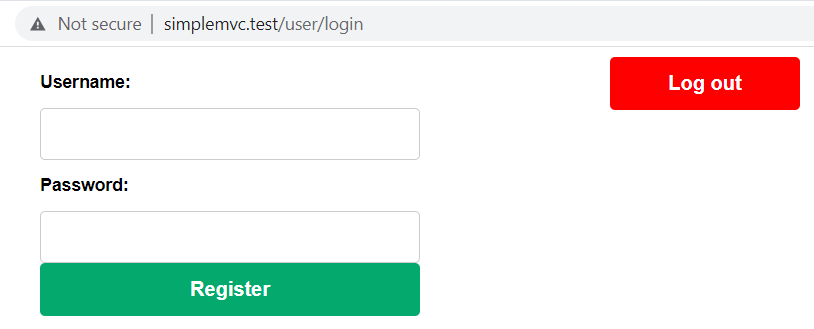
Let us change this. Replace the form as follows:
<?php if (isset($_SESSION["username"])): ?>
 <form action="<?= SITE_BASE ?>user/logout" method="POST">
    <button type="submit" class="danger">Log out</button>
 </form>
<?php endif; ?>
We are surrounding the form with a condition, and in case the session variable is present, the button won’t be shown.
That 's it. We have implemented authentication capabilities. We’ll finish this chapter with another utility class.
Let’s create a file called SessionChecker.php in the helpers folder with this content:
<?php
namespace helpers;

class SessionChecker {
  public static function check() {
      session_id(APP_SESSION_ID);
      session_start();

      if (!isset($_SESSION["username"])) {
          header('Location: '.SITE_BASE.'user/login');
          exit;
      }

      if (time() - $_SESSION["login_time_stamp"] > 3600) {
          session_unset();
          session_destroy();
          header('Location: '.SITE_BASE.'user/login');
          exit;
      }
  }
}
This class we’ll allow us to avoid code repetition, since we should check for the state of the user in many methods in a controller. For example, in our SiteController, we can add the following line:
use helpers\SessionChecker;
And the rewrite our index method as follows:
public function index()
{
    SessionChecker::check();

    $this->view->setAction('index');
    $this->view->render();
}
We are also destroying the session, and so login the user out, after an hour has passed. You can ignore that part by simply eliminating the condition, or change the time length.
Summary
In this chapter we gave our framework Register and Login capabilities. Having this functionality out of the box can save us a lot of time, since they’ll be needed in practically every application we build. Of course, we miss some features, like email verification, but we’ll get there, trust me.
I hope you are enjoying your journey so far. In the next chapters, we’ll do some refactoring and clean up, and deal with advanced concepts such as dependency injection.
See you soon!