Chapter 09: Advanced topics
Temas avanzados para fortalecer el framework: inyeccion de dependencias, Composer y autoloading PSR-4.
Introduction
This chapter serves two purposes:
First, to improve our framework introducing characteristics that many modern frameworks possess, and second, to teach you how those features work and are implemented.
We will see what dependency injection is and how it can be used to improve the maintainability and testability of our code, then we’ll move to using PSR-4 autoloading.
Dependency injection
Let’s take a look at the constructor of our ClientController:
public function __construct()
{
    $this->client = new Client('clients');
    $this->view = new View('clients');
}
On the surface, there is nothing bad here. We use the constructor to initialize two private properties, one referring to a model, and the other one to a view.
But, if we analyze the situation carefully, we can conclude that ClientController is tightly coupled to the Client and View classes. This means than in order to test the ClientController class we must instantiate the Client and View classes. Also, the ClientController knows too much about the Client and View classes. For example, it knows that both of them receive a parameter consisting in a string.
It may not look like much, but if we were to change the constructor of Client to include another parameter, we should make a change in the call made in the constructor of ClientController, and in every other part a Client object is instantiated in the project.
In larger projects, these could be really problematic, making the code less flexible and by extension less maintainable.
This can be mitigated using dependency injection.
What is dependency injection?
Dependency Injection is a software design pattern that allows avoiding hard-coding dependencies and makes possible to change the dependencies both at runtime and compile time.
What does this mean in the context of our application?
It means to write the method in this way:
public function __construct(Client $client, View $view)
{
    $this->client = $client;
    $this->view = $view;
}
In this way, we could use a mock for the client and view objects with the purpose of testing, or we could change the implementation of those objects, modifying the constructor, without impacting the ClientController class. Go ahead and make the changes. The application wont’ work at this point if you visit client/index, but this is ok.
Now let’s see the constructor of the Client model:
public function __construct($table)
{
    $this->table = $table;


    parent::__construct($this->table, $this->db);
    $this->key = 'id';
}
We could make a little tweak expliciting the type of the $table parameter:
public function __construct(string $table)
{
    $this->table = $table;


    parent::__construct($this->table, $this->db);
    $this->key = 'id';
}
Now it’s the turn of the View constructor:
public function __construct($controller)
{
    $this->controller = $controller;
}
Again, the class doesn’t depend on another class, it only receives a common parameter. Let’s specify the type:
public function __construct(string $controller)
{
    $this->controller = $controller;
}
So, the chain of dependencies is this:
ClientController needs two objects, Client and View. Client needs a string defining the table, and View needs a string that defines the controller (and the folder inside views).
Now, how can we make things work again?
If we go to Application.php, we can make these changes:
if (method_exists($controllerClass, $action)) {
  $model = new ('models\\'
    . ucwords($controller))($controller . 's');
  $view = new ('core\\View')($controller . 's');
  $dispatch = new $controllerClass(
    $model, $view, $controller, $action
  );
  call_user_func_array([$dispatch, $action],
    $queryString);
}
We are instantiating the necessary model and view, and we are injecting that dependencies in the controller. It should work now, but we are still using the new operator. It would be much better if you could find a view to instantiate the controller, and let the framework resolve the dependencies for us. That is the function of something called Container
A container is a tool to implement the dependency injection pattern. It allows us to register services with their respective dependencies.
The container can read the configuration from yaml files, text files, arrays, etc.
Our container class would be extremely simple. Let’s create a file called DependencyContainer.php in the core folder with the following content:
<?php
namespace core;

class DependencyResolver {
  private static $map = [];

  public static function set($key, $value) {
      if (!array_key_exists($key, self::$map)) {
          self::$map[$key] = $value;
      }
  }

  public static function resolveDependencies($class) {
      $reflector = new \ReflectionClass($class);
      $method = $reflector->getConstructor();
      $parameters = $method->getParameters();
      $dependencies = [];

      foreach ($parameters as $parameter) {
          $parameterType = $parameter->getType();

          if ($parameterType === null
            || $parameterType->isBuiltin()) {
              $parameterName = $parameter->getName();
              // Handling non classes parameters
              if (array_key_exists($parameterName, self::$map)) {
                  $dependencies[] = self::$map[
                    $parameterName
                  ];
              }
          } else {
              $dependencyClassName = $parameterType
                ->getName();
              $dependencies[] = self::resolveDependencies(
                $dependencyClassName
              );
          }
      }

      return $reflector->newInstanceArgs($dependencies);
  }
}
Our class has static methods so we can call them without creating a new instance. It also has a static property:
private static $map = [];
It’s a simple array. Let’s see the first method:
public static function set($key, $value) {
        if (!array_key_exists($key, self::$map)) {
            self::$map[$key] = $value;
        }
    }
The method is very simple. It stores a value associated with a key in an array. This will serve to store parameters that are not classes. You will see this later in practice.
Then we have another method. Let’s start with the definition:
public static function resolveDependencies($class)
It takes the name of a class as a parameter, for example “ClientController”.
Then we have these lines:
$reflector = new \ReflectionClass($class);
$method = $reflector->getConstructor();
$parameters = $method->getParameters();
$dependencies = [];
We use the ReflectionClass. This built in php class allows us to gather information about a class: properties with their respective types, methods and their parameters, etc.
We get the constructor of the class, and then the parameters. Following the case of ClientController, if we print the parameters variable, it will give us the following information:
Array (
[0] => ReflectionParameter Object ( [name] => client )
[1] => ReflectionParameter Object ( [name] => view )
 )
We have two parameters, they are objects, and the name of the parameters are client and view.
Then we iterate through these parameters. For every one of them, we get the type. It will take the first parameter, client, and see that its type is models\Client
We check if the type is null or if it’s an builtin type. This is not the case, so we have these two lines:
$dependencyClassName = $parameterType->getName();
$dependencies[] = self::resolveDependencies(
    $dependencyClassName
);
We take the class name of the parameter, and we call the same method. We are using recursion, since it is the most elegant and simple solution.
In the next iteration of the function, we’ll get the Client model, and see that it has one parameter that it’s a string.
$parameterName = $parameter->getName();
// Handling non classes parameters
if (array_key_exists($parameterName, self::$map)) {
    $dependencies[] = self::$map[$parameterName];
}
The parameter is not a class, so we check to see if the parameter (table) has a value in the map array. If it is, the dependency is stored in the dependencies array.
When all the dependencies are resolved, the dependencies array will have the following content:
Array
(
  [0] => models\Client Object
      (
          [table:protected] => clients
          [db:protected] => core\db Object
              (
                  [_connection:core\db:private]
                    => PDO Object
                      (
                      )

              )

          [key:protected] => id
          [data:core\Model:private] =>
          [id] =>
          [firstname:models\Client:private] =>
          [lastname:models\Client:private] =>
          [email:models\Client:private] =>
          [reg_date] =>
          [image_path] =>
      )

  [1] => core\View Object
      (
          [controller:core\View:private] => clients
          [action:core\View:private] =>
          [variables:core\View:private] => Array
              (
              )

      )

)
We can now create a new instance of the ClientController, passing in it the corresponding dependencies.
return $reflector->newInstanceArgs($dependencies);
We make use of the newInstanceArgs method of the ReflectionClass.
Now we need to make these changes to Application.php:
if (method_exists($controllerClass, $action)) {
 DependencyResolver::set('table', $controller . 's');
 DependencyResolver::set('controller', $controller . 's');

 $dispatch = DependencyResolver::resolveDependencies(
  $controllerClass
 );
 call_user_func_array([$dispatch, $action], $queryString);
}
Just to be sure, here is the gist with the full code of Application.php
PSR-4 Autoloading
So far we have relied on our own autoloading for framework and application specific classes. In bootstrap.php we have the function and the call:
function autoload($class)
{
  $directories = [
      'library',
      'application'
  ];

  foreach ($directories as $directory)
  {
      $file = ROOT . DS. $directory . DS
        . str_replace('\\', '/', $class) . '.php';
      if (file_exists($file)) {
          require_once($file);
      }
  }
}

spl_autoload_register('autoload');
There is nothing wrong with that, and in fact it works pretty well, but in order to build a robust framework, and at the same time advance our knowledge, it’s recommended to adhere to standards whenever possible.
What is PSR-4?
PSR-4 is an accepted recommendation that outlines the standard for autoloading classes via filenames.
This means that as long as we follow a certain convention to name our file, we can use composer to generate an autoloader.
For this to work, you need to download and install composer.
Now, go ahead and create a file named composer.json at the root of the project with the following content:
{
  "autoload": {
    "psr-4": {
      "SimpleMVC\\":"simplemvc/",
      "App\\":"application/"
    }
  }
}
What we are doing here is mapping our classes. The namespace SimpleMVC we’ll be mapped to the simplemvc folder. We don’t have it, but we’ll renamed the library model later.
The namespace App we’ll be mapped to the application folder.
Now, open a terminal at the root of the project and type:
composer dump-autoload
You we’ll see a new folder called vendor, as shown in Figure 46:
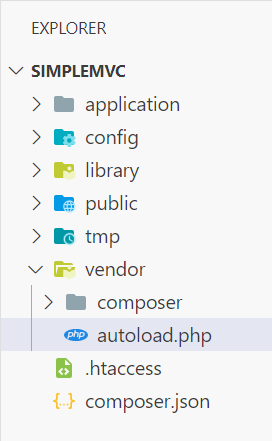
Inside that folder, there is an autoload.php, that has the following content:
<?php


// autoload.php @generated by Composer


if (PHP_VERSION_ID < 50600) {
    if (!headers_sent()) {
        header('HTTP/1.1 500 Internal Server Error');
    }
    $err = 'Composer 2.3.0 dropped support
    for autoloading on PHP <5.6
    and you are running '.PHP_VERSION.',
    please upgrade PHP or use Composer 2.2
    LTS via "composer self-update --2.2"
    . Aborting.'.PHP_EOL;
    if (!ini_get('display_errors')) {
        if (PHP_SAPI === 'cli' || PHP_SAPI === 'phpdbg') {
            fwrite(STDERR, $err);
        } elseif (!headers_sent()) {
            echo $err;
        }
    }
    trigger_error(
        $err,
        E_USER_ERROR
    );
}


require_once __DIR__ . '/composer/autoload_real.php';


return
  ComposerAutoloaderInit046ffdaaa41676ad930f030ef40bd67d
    ::getLoader();
The contents may differ, as the versions of composer change, but the most important thing to note id that there is a require sentence.
The autoload_real.php file contains the necessary logic to autoload the classes. We don’t need to understand what’s going on there for now, you can take a look later.
Now, we need to rename the folder library to simplemvc.
Then, we need to change the namespace of all the classes of the framework.
All the classes inside simplemvc -> core need to change the namespace from:
namespace core;
To:
namespace SimpleMVC\core;
The two helpers will have the namespace:
namespace SimpleMVC\helpers;
And the DataTable widget:
namespace SimpleMVC\widgets;
That covers the framework classes. We need to do something similar in the application classes. Open the ClientController. The namespace and the use sentences need to be rewritten as follows:
namespace App\controllers;

use SimpleMVC\core\Controller as Controller;
use App\models\Client as Client;
use SimpleMVC\core\View as View;
use SimpleMVC\widgets\DataTable as DataTable;
use SimpleMVC\core\db as db;
Now the Client model:
namespace App\models;

use SimpleMVC\core\Model as Model;
We are almost done. It’s time to change the entry point of our app, index.php. I’ll give you the entire code:
<?php
require "../vendor/autoload.php";
require "../config/config.php";

define('DS', DIRECTORY_SEPARATOR);
define('ROOT', dirname(dirname(__FILE__)));

if (!isset($_GET['url'])) $_GET['url'] = 'site/index';

$url = $_GET['url'];

require_once(ROOT . DS . 'simplemvc'
  . DS . 'bootstrap.php');
The changes are the two require sentences at the top, and the folder in which our bootstrap is. It’s no longer library but simplemvc.
In config.php there is one line we need to change. From:
use helpers\IP as IP;
To:
use SimpleMVC\helpers\IP as IP;
Our bootstrap.php becomes shorter, since we don’t need our custom autoloader any more:
<?php
$app = new \SimpleMVC\core\Application();

$app->setReporting();
$app->removeMagicQuotes();
$app->run($url);
Finally in Application.php. The line:
$controllerClass = 'controllers\\'
  . ucwords($controller) . 'Controller';
Becomes:
$controllerClass = 'App\\controllers\\'
  . ucwords($controller) . 'Controller';
And this check:
if (in_array('core\\Controller', $parents)) {
Becomes:
if (in_array('SimpleMVC\\core\\Controller', $parents)) {
There were a lot of changes, but if everything is correct, we should be able to see the client/index page.
Let’s see some errors we could get. For example, if you type: http://simplemvc.test/user/login
You’ll get an error as shown in Figure 47:

That is expected, because we haven’t changed the namespace and the use sentences. We need to rewrite them like this:
namespace App\controllers;

use SimpleMVC\core\Controller as Controller;
use App\models\User as User;
use SimpleMVC\core\View as View;
use SimpleMVC\core\db as db;
We also need to make changes to the User model, the namespace and the only use sentence:
namespace App\models;

use SimpleMVC\core\Model as Model;
Finally, the changes to SiteController:
namespace App\controllers;

use SimpleMVC\core\Controller as Controller;
use SimpleMVC\core\View as View;
use SimpleMVC\helpers\SessionChecker;
Summary
This chapter served two purposes:
First, to improve our framework introducing characteristics that many modern frameworks possess, and second, show how those features work and are implemented.
We saw what dependency injection is and how it can be used to improve the maintainability and testability of our code, then we used PSR-4 autoloading thanks to composer.
Our framework has matured a lot. Of course there is a lot of room to improve, but we have a solid base to develop well structured applications.
In the next chapters, we’ll put our framework to use building a real world application.
See you soon!