Chapter 11: Clinic Management App Part II, Database
Modelo de datos de Clinic Management, modelos, controladores y primeras pantallas operativas.
Introduction
In this chapter we’ll define the database structure. We’ll incorporate a template for the interface, and develop the first models and controllers.
Data Structure
Our application will need the following entities:
- doctors
- nurses
- patients
- appointments
- medical_records
- treatments
- specialties
We’ll map doctors and nurses to a single table named personnel. Here is the sql sentence to create the table:
CREATE TABLE `clinicmanagement`.`employees` (
`id` INT NOT NULL AUTO_INCREMENT ,
`firstname` VARCHAR(30) NOT NULL ,
`lastname` VARCHAR(30) NOT NULL ,
`type` TINYINT(1) NOT NULL ,
`userid` INT NOT NULL ,
PRIMARY KEY (`id`)
) ENGINE = InnoDB;
And here is the patients table:
CREATE TABLE `clinicmanagement`.`patients` (
`id` INT NOT NULL AUTO_INCREMENT ,
`firstname` VARCHAR(30) NOT NULL ,
`lastname` VARCHAR(30) NOT NULL ,
`birthdate` DATE NOT NULL ,
`gender` VARCHAR(1) NOT NULL ,
`bloodtype` VARCHAR(3) NOT NULL ,
`phone` VARCHAR(20) NOT NULL ,
`email` VARCHAR(50) NOT NULL ,
`address` VARCHAR(255) NOT NULL ,
PRIMARY KEY (`id`)
) ENGINE = InnoDB;
Employee Model
Based on our previous knowledge, the Employee model will be very simple:
<?php
namespace App\models;

use SimpleMVC\core\Model as Model;

class Employee extends Model {
    public $id;
    private $firstname;
    private $lastname;
    private $type;
    private $userid;

    public function __construct(string $table)
    {
        $this->table = $table;


        parent::__construct($this->table, $this->db);
        $this->key = 'id';
    }

    public function setFirstName($firstName)
    {
        $this->firstname = $firstName;
    }

    public function setLastName($lastName)
    {
        $this->lastname = $lastName;
    }

    public function setType($type)
    {
        $this->type = $type;
    }

    public function setUserId($userId)
    {
        $this->userid = $userId;
    }

    public function getFirstName()
    {
        return $this->firstname;
    }

    public function getLastName()
    {
        return $this->lastname;
    }

    public function getType()
    {
        return $this->type;
    }

    public function getUserId()
    {
        return $this->userid;
    }
}
Likewise, the EmployeeController is very similar to the ClientController:
<?php
namespace App\controllers;

use SimpleMVC\core\Controller as Controller;
use App\models\Employee as Employee;
use SimpleMVC\core\View as View;
use SimpleMVC\widgets\DataTable as DataTable;
use SimpleMVC\core\db as db;

class EmployeeController extends Controller {
  private $employee;
  private $view;
  private $db;

  public function __construct(
    Employee $employee,
    View $view
  )
  {
      $this->employee = $employee;
      $this->view = $view;
  }

  public function index()
  {
    $dataTable = new DataTable(
      ['firstname', 'lastname', 'type', 'id'],
      'id', 'employee'
    );

    $this->view->setAction("index");
    $this->view->set('grid', $dataTable);

    $scripts = <<<scripts
    $( document ).ready(function() {
      table = $('#data-table').DataTable({
        "ajax":{
          url :"/employee/data", // json datasource
          type: "post"  // type of method, GET/POST/DELETE
        },
        columns: [
          {"data": 0},{"data": 1},{"data": 2}, {
            data: null,
            orderable: false,
            searchable: false,
            className: "center",
            render: function (data, type, full, meta) {
              return '<a href="/employee/view/'
                +data[3]+'" title="View">View</a>' + ' ' +
                '<a href="/employee/edit/'
                +data[3]+'" title="Edit">Edit</a>' + ' ' +
                '<a href="javascript: void(0);"
                title="Delete"
                onclick="del('+data[3]+')">Delete</a>';
            }
          }
        ]
      });
    });
    scripts;
    return $this->view->render(true, $scripts);
  }

  public function data()
  {
    $params = $_REQUEST;

    $where = "";


    $columns = array(
      0 =>'firstname',
      1 =>'lastname',
      2 =>'type',
      3 =>'id'
    );

    $data = [];

    $queryTot =
      $queryRec = "SELECT firstname, lastname, type, id
        FROM employees";

    // check search value exist
    if( !empty($params['search']['value']) ) {
      $where .=" WHERE ";
      $where .=" ( firstname LIKE '"
        .$params['search']['value']."%' ";
      $where .=" OR lastname LIKE '"
        .$params['search']['value']."%' ";
      $where .=" OR type LIKE '"
        .$params['search']['value']."%' )";

      $queryTot .= $where;
      $queryRec .= $where;
    }

    if( !empty($params['order'][0]) ) {
      $queryRec .= " ORDER BY "
        . $columns[$params['order'][0]['column']]." "
        .$params['order'][0]['dir']." LIMIT "
        .$params['start']." ,".$params['length']." ";
    }

    $this->db = new db(CONFIG);

    $employees = $this->db->query($queryRec);

    foreach ($employees as $employee) {
      foreach ($employee as $key => $value) {
        $item[] = $value;
      }
      $data[] = $item;
      $item = [];
    }

    $totalRecords = count($this->db->query($queryTot));

    $draw = ( !empty($params['draw']) )
      ? intval( $params['draw'] ) : false;

    $json_data = array(
      "draw"            => $draw,
      "recordsTotal"    => intval( $totalRecords ),
      "recordsFiltered" => intval($totalRecords),
      "data"            => $data   // total data array
    );

    echo json_encode($json_data);
    exit;
  }

  public function view($id)
  {
    $employee = $this->employee->loadModel($id);

    if ($employee) {
      $this->view->setAction('view');
      $this->view->set('employee', $employee);
      $this->view->render();
    }
  }

  public function add()
  {
    if ($_SERVER["REQUEST_METHOD"] == 'POST') {
      $data = [
        'firstname' => $_POST["firstname"],
        'lastname' => $_POST["lastname"],
        'type' => $_POST["type"]
      ];


      $this->employee->load($data);
      $this->employee->save();

      header('Location: '.SITE_BASE.'employee/index/');
      exit;
    }

    $this->view->setAction('add');
    $this->view->set('employee', $this->employee);
    $this->view->render();
  }

  public function edit($id)
  {
    if ($_SERVER["REQUEST_METHOD"] == 'POST') {
      $data = [
        'firstname' => $_POST["firstname"],
        'lastname' => $_POST["lastname"],
        'type' => $_POST["type"]
      ];

      $this->employee->load($data);
      $this->employee->save($id);

      header('Location: '.SITE_BASE.'employee/index/');
      exit;
    }

    $this->employee->loadModel($id);
    $this->view->setAction('edit');
    $this->view->set('employee', $this->employee);
    $this->view->render();
  }

  public function delete()
  {
    if (!isset($_REQUEST["id"])) {
      echo "error";
    } else {
      if ($this->employee->del("id", $_REQUEST["id"])) {
        echo "success";
      } else {
        echo "error";
      }
    }
    exit;
  }
}
I recommend you that you copy the code from this gist instead of trying to fix the code of the book.
Now, we need to add a new folder in views. Following the convention, we’ll name it employees. In that folder, we need an index.php file with just one line of content:
<?php $grid->render(); ?>
But if you visit http://clinicmanagement.test/employee/index it won’t work. That is because we haven’t included the necessary javascript and css files in our main layout.
After this line:
<script src="dist/js/adminlte.js"></script>
Place these:
<!-- Datatable -->
<script
  src="plugins/datatables/jquery.dataTables.min.js">
</script>
<!-- SweetAlert2 -->
<script
  src="plugins/sweetalert2/sweetalert2.all.js"></script>
<script type="text/javascript">
    <?= $scripts; ?>
</script>
The scripts come included with the adminlte template. In the case of SweetAlert2, the sweetalert2.all.js takes care of the css as well.
Then, just before the closing tag we need to add:
<link rel="stylesheet"
href=
'//cdn.datatables.net/1.13.4/css/jquery.dataTables.min
.css'
>
Note: the above should be one line in your code, I had to split it to avoid the text wordwrap.
Go ahead and add a couple of records to the table as shown in Figure 54.
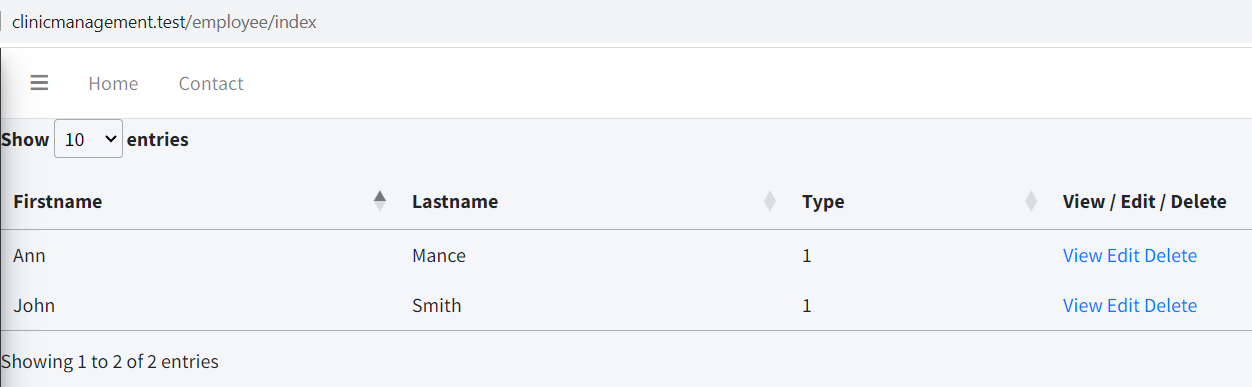
It looks too close to the borders. Go to the index view and change the content to this:
<section class="content">
    <div class="container-fluid">
        <?php $grid->render(); ?>
    </div>
</section>
Now it should look better (Figure 55):
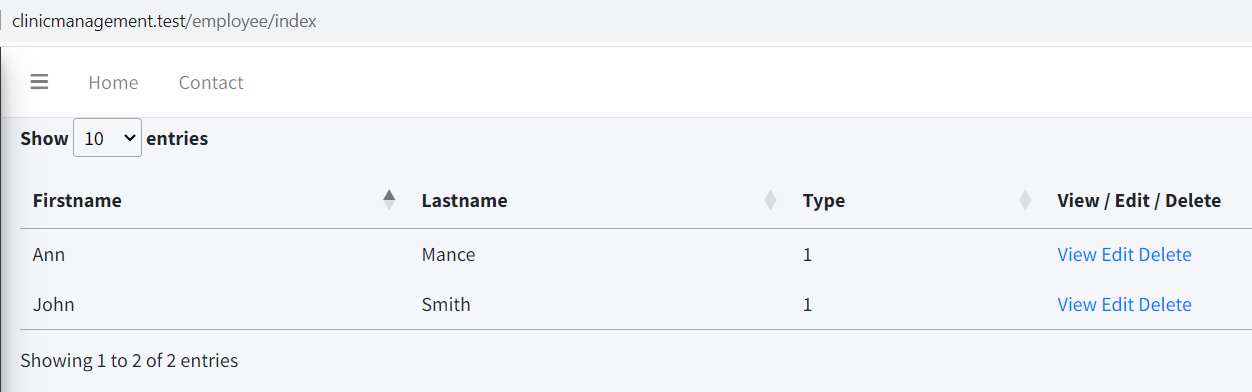
It looks better, but we can improve it. Change the index view from employees to the following:
<section class="content">
    <div class="container-fluid">
        <div class="card">
            <div class="card-header">
                <h3 class="card-title">Staff</h3>
            </div>
            <div class="card-body">
                <?php $grid->render(); ?>
            </div>
        </div>
    </div>
</section>
It should look like this now (Figure 56):
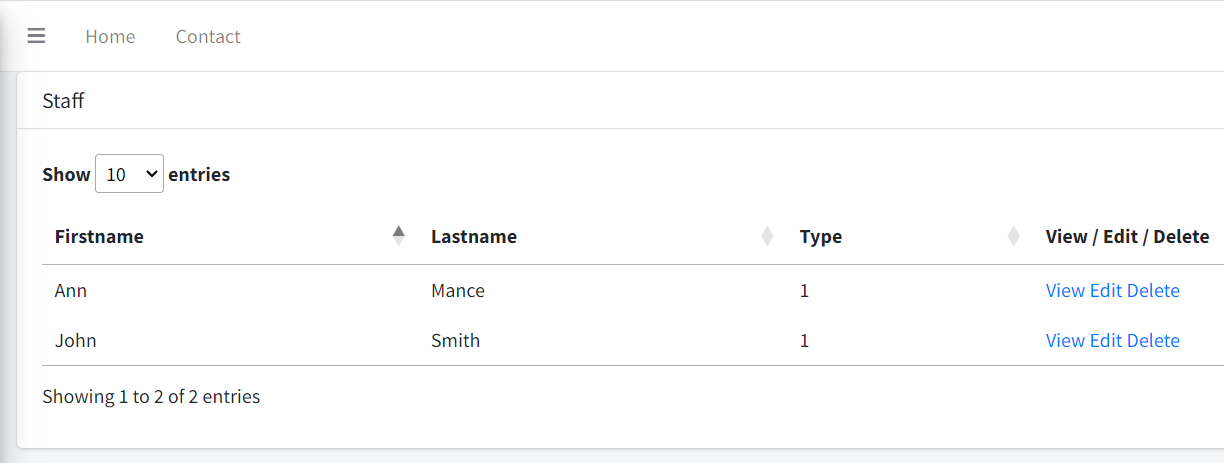
One final touch. Let 's add a title. Again, change index.php to:
<section class="content-header">
    <div class="container-fluid">
    <div class="row mb-2">
        <div class="col-sm-6">
            <h1>Employees</h1>
        </div>
    </div>
    </div><!-- /.container-fluid -->
</section>
<section class="content">
    <div class="container-fluid">
        <div class="card">
            <div class="card-header">
                <h3 class="card-title">Staff</h3>
            </div>
            <div class="card-body">
                <?php $grid->render(); ?>
            </div>
        </div>
    </div>
</section>
Now we have the final result (Figure 57):
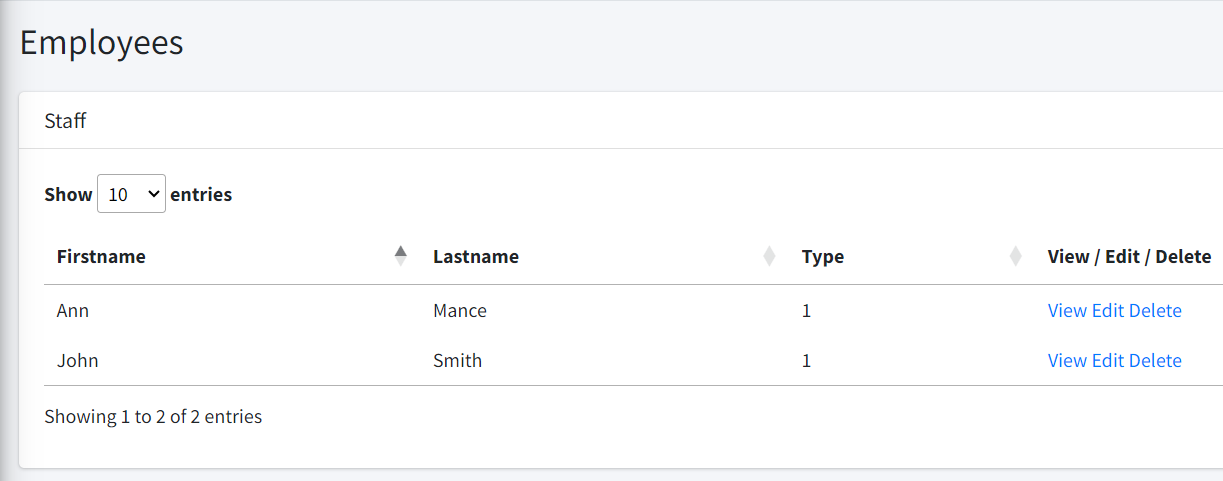
The View and Edit options don’t work, also, we don’t have an option to add a new professional. Let 's fix that.
Inside views -> employees, add a new file called view.php with the following content:
<!-- Content Header (Page header) -->
<section class="content-header">
  <div class="container-fluid">
  <div class="row mb-2">
    <div class="col-sm-6">
    <h1>Profile</h1>
    </div>
    <div class="col-sm-6">
    <ol class="breadcrumb float-sm-right">
      <li class="breadcrumb-item">
        <a href="employee/index">Employee</a>
      </li>
      <li class="breadcrumb-item active">Profile</li>
    </ol>
    </div>
  </div>
  </div><!-- /.container-fluid -->
</section>
<section class="content">
  <div class="container-fluid">
    <div>
      <div>
        <!-- Profile Image -->
        <div class="card card-primary card-outline">
          <div class="card-body box-profile">
          <div class="text-center">
            <img
            class="profile-user-img img-fluid img-circle"
              src="dist/img/user4-128x128.jpg"
              alt="User profile picture">
          </div>

          <h3 class="profile-username text-center">
            <?= $employee->firstname . ' '
              . $employee->lastname  ?>
          </h3>

          <p class="text-muted text-center">
            <?= $employee->type ?>
          </p>

          <a href="employee/edit/<?= $employee->id ?>"
            class="btn btn-primary btn-block">
            <b>Edit</b>
          </a>
          </div>
          <!-- /.card-body -->
        </div>
        <!-- /.card -->
      </div>
    </div>
  </div>
</section>
First, we’ll add a new button. In the index view, right after:
<h3 class="card-title">Staff</h3>
Add the following:
<div class="float-right">
    <a href="<?= SITE_BASE ?>employee/add"
      class="btn btn-primary">
         New Professional
    </a>
</div>
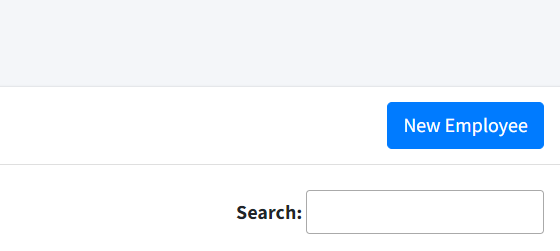
We should see a new button floating at the right (Figure 58).
As we did with the clients in previous chapters, we’ll add a partial with the form. Create a file called _form.php:
<div class="form-group">
  <label for="firstname">First Name:</label>
  <input type="text" name="firstname"
      class="form-control"
        value="<?= $employee->firstname ?>">
</div>
<div class="form-group">
  <label for="lastname">Last Name:</label>
  <input type="text" name="lastname"
      class="form-control"
        value="<?= $employee->lastname ?>">
</div>
<div class="form-group">
  <label for="type">Type:</label>
  <select name="type" id="option"
      class="form-control">
      <option value="1"
          <?php echo ($employee->type == 1)
            ? "selected": "" ?> >
          Doctor</option>
      <option value="2"
          <?php echo ($employee->type == 2)
            ? "selected": "" ?>>
          Nurse</option>
      <option value="3"
          <?php echo ($employee->type == 3)
            ? "selected": "" ?>>
          Administrative</option>
  </select>
</div>
<button type="submit" class="btn btn-primary btn-block">
  Save
</button>
Let’s add another partial to display called _form_header.php:
<!-- Content Header (Page header) -->
<section class="content-header">
  <div class="container-fluid">
  <div class="row mb-2">
    <div class="col-sm-6">
    <h1>Employee</h1>
    </div>
    <div class="col-sm-6">
    <ol class="breadcrumb float-sm-right">
      <li class="breadcrumb-item">
        <a href="employee/index">
        Employee
        </a>
      </li>
      <li class="breadcrumb-item active">
        <?= $action ?>
      </li>
    </ol>
    </div>
  </div>
  </div><!-- /.container-fluid -->
</section>
We’ll use it to avoid code duplication in the add and edit views.
Now it’s time for the add.php file:
<?php
  $action = 'Add';
  include '_form_header.php';
?>
<section class="content">
  <div class="container-fluid">
    <div class="card">
      <div class="card-body">
        <form action="<?= SITE_BASE ?>employee/add"
          method="POST">
          <?php include '_form.php'; ?>
        </form>
      </div>
    </div>
  </div>
</section>
And now the edit.php file:
<?php
  $action = 'Edit';
  include '_form_header.php';
?>
<section class="content">
<div class="container-fluid">
  <div class="card">
    <div class="card-body">
    <form
    action="<?= SITE_BASE ?>employee/edit/<?= $employee->id ?>"
    method="POST">
      <?php include '_form.php'; ?>
    </form>
    </div>
  </div>
</div>
</section>
You can try adding, editing and deleting employees. Of course, we need to restrict these operations, and we’ll implement the corresponding security measures later. But for now, it’s time to move on to the CRUD operations on patients.
Patient Model
<?php
namespace App\models;

use SimpleMVC\core\Model as Model;

class Patient extends Model {
    public $id;
    private $firstname;
    private $lastname;
    private $birthdate;
    private $gender;
    private $bloodtype;
    private $phone;
    private $email;
    private $address;

    public function __construct(string $table)
    {
        $this->table = $table;


        parent::__construct($this->table, $this->db);
        $this->key = 'id';
    }

    public function setFirstName($firstName)
    {
        $this->firstname = $firstName;
    }

    public function setLastName($lastName)
    {
        $this->lastname = $lastName;
    }

    public function setGender($gender)
    {
        $this->gender = $gender;
    }

    public function setBirthdate($birthdate)
    {
        $this->birthdate = $birthdate;
    }

    public function setBloodtype($bloodtype)
    {
        $this->bloodtype = $bloodtype;
    }

    public function setPhone($phone)
    {
        $this->phone = $phone;
    }

    public function setEmail($email)
    {
        $this->email = $email;
    }

    public function setAddress($address)
    {
        $this->address = $address;
    }

    public function getFirstName()
    {
        return $this->firstname;
    }

    public function getLastName()
    {
        return $this->lastname;
    }

    public function getBirthdate()
    {
        return $this->birthdate;
    }

    public function getGender()
    {
        return $this->gender;
    }

    public function getBloodtype()
    {
        return $this->bloodtype;
    }

    public function getPhone()
    {
        return $this->phone;
    }

    public function getEmail()
    {
        return $this->email;
    }

    public function getAddress()
    {
        return $this->address;
    }

    public function getAge()
    {
        return
          date('Y')
          - date('Y', strtotime($this->birthdate));
    }
}
The only thing worth mentioning is the getAge method. We’ll use it to display the age of the patient. Thanks to our base model, we can call it as a property: $patient->age.
PatientController
<?php
namespace App\controllers;

use SimpleMVC\core\Controller as Controller;
use App\models\Patient as Patient;
use SimpleMVC\core\View as View;
use SimpleMVC\widgets\DataTable as DataTable;
use SimpleMVC\core\db as db;

class PatientController extends Controller {
  private $patient;
  private $view;
  private $db;

  public function __construct(
    Patient $patient,
    View $view
  )
  {
      $this->patient = $patient;
      $this->view = $view;
  }

  public function index()
  {
    $dataTable = new DataTable(
      ['firstname', 'lastname', 'birthdate',
      'gender', 'bloodtype', 'id'],
      'id', 'patient'
    );

    $this->view->setAction("index");
      $this->view->set('grid', $dataTable);

    $scripts = <<<scripts
    $( document ).ready(function() {
        table = $('#data-table').DataTable({
          "ajax":{
              url :"/patient/data",
              type: "post"
          },
          columns: [
            {"data": 0},
            {"data": 1},
            {"data": 2},
            {"data": 3},
            {"data": 4}, {
              data: null,
              orderable: false,
              searchable: false,
              className: "center",
              render: function (data, type, full, meta) {
                  return '<a href="/patient/view/'+data[5]
                        +'" title="View">View</a>' + ' ' +
                      '<a href="/patient/edit/'+data[5]
                        +'" title="Edit">Edit</a>' + ' ' +
                      '<a href="javascript: void(0);"
                        title="Delete"
                        onclick="del('+data[5]+')">
                        Delete
                      </a>';
              }
            }
          ]
        });
      });
    scripts;
    return $this->view->render(true, $scripts);
  }

  public function data()
  {
      $params = $_REQUEST;

      $where = "";

      $columns = array(
          0 =>'firstname',
          1 =>'lastname',
          2 =>'birthdate',
          3 =>'gender',
          4 =>'bloodtype',
          5 =>'id'
      );

      $data = [];

      $queryTot = $queryRec = "SELECT
      firstname, lastname, birthdate, gender, bloodtype,
      id
      FROM patients";

      // check search value exist
      if( !empty($params['search']['value']) ) {
          $where .=" WHERE ";
          $where .=" ( firstname LIKE '"
            .$params['search']['value']."%' ";
          $where .=" OR lastname LIKE '"
            .$params['search']['value']."%' ";
          $where .=" OR birthdate LIKE '"
            .$params['search']['value']."%' ";
          $where .=" OR gender LIKE '"
            .$params['search']['value']."%' ";
          $where .=" OR bloodtype LIKE '"
            .$params['search']['value']."%' )";

          $queryTot .= $where;
          $queryRec .= $where;
      }

      if( !empty($params['order'][0]) ) {
          $queryRec .= " ORDER BY "
            . $columns[$params['order'][0]['column']]." "
            .$params['order'][0]['dir']." LIMIT "
            .$params['start']
            ." ,".$params['length']." ";
      }

      $this->db = new db(CONFIG);

      $patients = $this->db->query($queryRec);

      foreach ($patients as $patient) {
          foreach ($patient as $key => $value) {
              $item[] = $value;
          }
          $data[] = $item;
          $item = [];
      }

      $totalRecords = count($this->db->query($queryTot));

      $draw = ( !empty($params['draw']) )
        ? intval( $params['draw'] ) : false;

      $json_data = array(
          "draw"            => $draw,
          "recordsTotal"    => intval( $totalRecords ),
          "recordsFiltered" => intval($totalRecords),
          "data"            => $data   // total data array
      );

      echo json_encode($json_data);
      exit;
  }

  public function view($id)
  {
      $patient = $this->patient->loadModel($id);

      if ($patient) {
          $this->view->setAction('view');
          $this->view->set('patient', $patient);
          $this->view->render();
      }
  }

  public function add()
  {
    if ($_SERVER["REQUEST_METHOD"] == 'POST') {
      $_POST['birthdate'] = date_format(
        new \DateTime($_POST['birthdate']), 'Y-m-d'
      );
      $data = [
          'firstname' => $_POST["firstname"],
          'lastname' => $_POST["lastname"],
          'birthdate' => $_POST["birthdate"],
          'gender' => $_POST["gender"],
          'bloodtype' => $_POST["bloodtype"],
          'phone' => $_POST["phone"],
          'email' => $_POST["email"],
          'address' => $_POST["address"]
      ];

      $this->patient->load($data);
          $this->patient->save();

      header('Location: ' . SITE_BASE . 'patient/index/');
      exit;
    }

      $scripts = <<<scripts
      //Date picker
      $( document ).ready(function() {
          $('#birthdate').datetimepicker({
              format: 'L'
          })
      });
      scripts;

      $this->view->setAction('add');
      $this->view->set('patient', $this->patient);
      $this->view->render(true, $scripts);
  }

  public function edit($id)
  {
      if ($_SERVER["REQUEST_METHOD"] == 'POST') {
          $_POST['birthdate'] = date_format(
            new \DateTime($_POST['birthdate']), 'Y-m-d'
          );
          $data = [
              'firstname' => $_POST["firstname"],
              'lastname' => $_POST["lastname"],
              'birthdate' => $_POST["birthdate"],
              'gender' => $_POST["gender"],
              'bloodtype' => $_POST["bloodtype"],
              'phone' => $_POST["phone"],
              'email' => $_POST["email"],
              'address' => $_POST["address"]
          ];

          $this->patient->load($data);
          $this->patient->save($id);

          header('Location: '.SITE_BASE.'patient/index/');
           exit;
      }

      $this->patient->loadModel($id);
      $this->view->setAction('edit');
      $this->view->set('patient', $this->patient);
      $this->view->render();
  }

  public function delete()
  {
    if (!isset($_REQUEST["id"])) {
      echo "error";
    } else {
      if ($this->patient->del("id", $_REQUEST["id"])) {
          echo "success";
      } else {
          echo "error";
      }
    }
    exit;
  }
}
Again, it's probably better to give you the gist
Nothing new in the controller code. Next the views. As you already know, you need to add the patients folder.
The index.php file:
<section class="content-header">
 <div class="container-fluid">
 <div class="row mb-2">
     <div class="col-sm-6">
        <h1>Patients</h1>
     </div>
 </div>
 </div><!-- /.container-fluid -->
</section>
<section class="content">
  <div class="container-fluid">
    <div class="card">
      <div class="card-header">
        <h3 class="card-title">Patients</h3>
        <div class="float-right">
          <a href="<?= SITE_BASE ?>patient/add"
            class="btn btn-primary">
            New Patient
          </a>
        </div>
      </div>
      <div class="card-body">
        <?php $grid->render(); ?>
      </div>
    </div>
  </div>
</section>
The _form_header.php file:
<!-- Content Header (Page header) -->
<section class="content-header">
  <div class="container-fluid">
  <div class="row mb-2">
      <div class="col-sm-6">
      <h1>Patient</h1>
      </div>
      <div class="col-sm-6">
      <ol class="breadcrumb float-sm-right">
        <li class="breadcrumb-item">
          <a href="patient/index">Patients</a>
        </li>
        <li class="breadcrumb-item active">
          <?= $action ?>
        </li>
      </ol>
      </div>
  </div>
  </div><!-- /.container-fluid -->
</section>
The _form.php file:
<div class="form-group">
  <label for="firstname">First Name:</label>
  <input type="text" name="firstname"
    class="form-control"
      value="<?= $patient->firstname ?>">
</div>
<div class="form-group">
  <label for="lastname">Last Name:</label>
  <input type="text" name="lastname"
    class="form-control"
      value="<?= $patient->lastname ?>">
</div>
<div class="form-group">
  <label>Birthdate:</label>
  <div class="input-group date" id="birthdate"
    data-target-input="nearest">
      <input type="text" name="birthdate"
        class="form-control datetimepicker-input"
        data-target="#birthdate"
        value="<?= $patient->birthdate ?>"/>
      <div class="input-group-append"
        data-target="#birthdate"
        data-toggle="datetimepicker">
          <div class="input-group-text">
            <i class="fa fa-calendar"></i>
          </div>
      </div>
  </div>
</div>
<div class="form-group">
  <label for="gender">Gender:</label>
  <select name="gender" id="option"
    class="form-control" required>
      <option value="">--Select--</option>
      <option value="F"
        <?php
        echo
        ($patient->gender == "F") ? "selected": "" ?>>
        F</option>
      <option value="M"
        <?php
        echo
        ($patient->gender == "M") ? "selected": "" ?>>
        M
      </option>
      <option value="O"
        <?php
        echo
        ($patient->gender == "O") ? "selected": "" ?>>
        O
      </option>
  </select>
</div>
<div class="form-group">
  <label for="bloodtype">Bloodtype:</label>
  <select name="bloodtype" id="option"
    class="form-control">
      <option value="">--Select--</option>
      <option value="A+"
        <?php
        echo ($patient->bloodtype == "A+") ?
        "selected": "" ?>>A+</option>
      <option value="A-"
        <?php
        echo ($patient->bloodtype == "A-") ?
        "selected": "" ?>>A-</option>
      <option value="B+"
        <?php
        echo ($patient->bloodtype == "B+") ?
        "selected": "" ?>>B+</option>
      <option value="B-"
        <?php
        echo ($patient->bloodtype == "B-") ?
        "selected": "" ?>>B-</option>
      <option value="AB+"
        <?php
        echo ($patient->bloodtype == "AB+") ?
        "selected": "" ?>>AB+</option>
      <option value="AB-"
        <?php
        echo ($patient->bloodtype == "AB-") ?
        "selected": "" ?>>AB-</option>
      <option value="O+"
        <?php
        echo ($patient->bloodtype == "O+") ?
        "selected": "" ?>>O+</option>
      <option value="O-"
        <?php
        echo ($patient->bloodtype == "O-") ?
        "selected": "" ?>>O-</option>
  </select>
</div>
<div class="form-group">
  <label for="phone">Phone:</label>
  <input type="text" name="phone" class="form-control"
    value="<?= $patient->phone ?>">
</div>
<div class="form-group">
  <label for="email">Email:</label>
  <input type="text" name="email" class="form-control"
    value="<?= $patient->email ?>">
</div>
<div class="form-group">
  <label for="address">Address:</label>
  <input type="text" name="address" class="form-control"
    value="<?= $patient->address ?>">
</div>
<button type="submit"
class="btn btn-primary btn-block">Save</button>
Here is the gist
The add.php file:
<?php
    $action = 'Add';
    include '_form_header.php';
?>
<section class="content">
    <div class="container-fluid">
        <div class="card">
            <div class="card-body">
                <form
                  action="<?= SITE_BASE ?>patient/add"
                  method="POST">
                    <?php include '_form.php'; ?>
                </form>
            </div>
        </div>
    </div>
</section>
The edit.php file:
<?php
    $action = 'Edit';
    include '_form_header.php';
?>
<section class="content">
  <div class="container-fluid">
    <div class="card">
      <div class="card-body">
      <form
      action="<?= SITE_BASE ?>patient/edit/<?= $patient->id ?>"
        method="POST">
          <?php include '_form.php'; ?>
      </form>
      </div>
    </div>
  </div>
</section>
And the view.php. This would be a little bit longer, and it will have some placeholder space for now:
<?php
    $action = 'Patient';
    include '_form_header.php';
?>

<!-- Main content -->
<section class="content">
    <div class="container-fluid">
    <div class="row">
        <div class="col-md-3">

        <!-- Profile Image -->
        <div class="card card-primary card-outline">
            <div class="card-body box-profile">
            <div class="text-center">
                <img
                class="profile-user-img img-fluid
                  img-circle"
                  src="../../dist/img/user4-128x128.jpg"
                  alt="User profile picture">
            </div>

            <h3 class="profile-username text-center">
              <?= $patient->firstname
                . ' ' . $patient->lastname ?>
            </h3>

            <ul
              class="list-group
                list-group-unbordered mb-3">
                <li class="list-group-item">
                  <b>Age</b>
                  <a class="float-right">
                    <?= $patient->age ?>
                  </a>
                </li>
                <li class="list-group-item">
                  <b>Bloodtype</b>
                  <a class="float-right">
                    <?= $patient->bloodtype ?>
                  </a>
                </li>
            </ul>

            <a
            href=
            "<?= SITE_BASE ?>patient/edit/<?= $patient->id ?>"
            class="btn btn-primary btn-block">
              <b>Edit</b>
            </a>
            </div>
            <!-- /.card-body -->
        </div>
        <!-- /.card -->

        <!-- About Me Box -->
        <div class="card card-primary">
            <div class="card-header">
            <h3 class="card-title">Contact</h3>
            </div>
            <!-- /.card-header -->
            <div class="card-body">
            <strong><i class="fas fa-phone mr-1"></i>
              Phone
            </strong>

            <p class="text-muted">
                <?= $patient->phone ?>
            </p>

            <hr>

            <strong>
              <i class="fas fa-map-marker-alt mr-1">
              </i> Address
            </strong>

            <p class="text-muted">
              <?= $patient->address ?>
            </p>

            <hr>

            <strong>
              <i class="fas fa-envelope mr-1"></i> Email
            </strong>

            <p class="text-muted">
              <?= $patient->email ?>
            </p>
            </div>
            <!-- /.card-body -->
        </div>
        <!-- /.card -->
        </div>
        <!-- /.col -->
        <div class="col-md-9">
        <div class="card">
            <div class="card-header p-2">
            <ul class="nav nav-pills">
                <li class="nav-item">
                  <a class="nav-link active"
                    href="#visits"
                    data-toggle="tab">Visits</a>
                </li>
                <li class="nav-item">
                  <a class="nav-link" href="#exams"
                    data-toggle="tab">Exams</a>
                </li>
            </ul>
            </div><!-- /.card-header -->
            <div class="card-body">
            <div class="tab-content">
                <div class="active tab-pane" id="visits">
                <!-- The Timeline -->
                <div>

                </div>
                <!-- /.timeline -->
                </div>
                <!-- /.tab-pane -->
                <div class="tab-pane" id="exams">
                <!-- Post -->
                <div class="post">

                </div>
                <!-- /.post -->
                <!-- /.tab-pane -->
            </div>
            <!-- /.tab-content -->
            </div><!-- /.card-body -->
        </div>
        <!-- /.card -->
        </div>
        <!-- /.col -->
    </div>
    <!-- /.row -->
    </div><!-- /.container-fluid -->
</section>
<!-- /.content -->
Here is the gist
We are reusing our _form_header.php. It’s probably a good idea to rename the file as _patient_header.php, let’s do that. Then we need to alter the include sentences in add.php, edit.php and view.php to:
include '_patient_header.php';
We’ve made a lot of work in this chapter. It’s better to leave it like this for the moment. I’ll give you the gists to the files to make sure everything is working.
Employee EmployeeController Patient PatientController
Summary
In this chapter we’ve defined the database structure. We’ve also incorporated a template for the interface, and developed the first models and controllers.
Our application is growing, we have a lot of work to do, but the progress has been noticeable. In the next chapter we’ll work on the CRUD of specialties and medical records.
See you soon!