Chapter 12: Clinic Management App Part III, Medical Records
Historia clinica, especialidades, relaciones entre modelos y consultas de visitas medicas.
Introduction
In this chapter we’ll be working on the specialties CRUD, and linking professionals to one or more specialties. Then we’ll work on the logic behind adding new medical records for patients. In the process, we’ll be adding new capabilities to our framework, such as defining relations between models.
Specialities table
The structure is very simple, only two fields:
CREATE TABLE `clinicmanagement`.`specialties` (
`id` INT NOT NULL AUTO_INCREMENT ,
`description` VARCHAR(50) NOT NULL ,
PRIMARY KEY (`id`)
) ENGINE = InnoDB;
We can insert the records already:
INSERT INTO `specialties` (`id`, `description`) VALUES
(1, 'Work medicine'),
(2, 'General clinic'),
(3, 'Gynecology'),
(4, 'Pediatrics'),
(5, 'Dermatology'),
(6, 'Gastroenterology');
We are not going to create a Controller yet, but we need a Model. Create a file called Specialty.php:
<?php
namespace App\models;

use SimpleMVC\core\Model as Model;

class Specialty extends Model {
    public $id;
    private $description;

    public function __construct()
    {
        $this->table = 'specialties';


        parent::__construct($this->table, $this->db);
        $this->key = 'id';
    }

    public function setDescription($description)
    {
        $this->description = $description;
    }

    public function getDescription()
    {
        return $this->description;
    }
}
We also need a pivot table to link professionals to specialties:
CREATE TABLE `clinicmanagement`.`employees_specialties` (
`employee_id` INT NOT NULL ,
`specialty_id` INT NOT NULL
) ENGINE = InnoDB;
Insert a couple of records so we have something to test.
Model’s Relations
In the case of the professionals, they could have one or more specialties, and one specialty can be assigned to one or more professionals; this is a many to many relation. If we consider the patients, they can have one or more visits to the clinic, that is a one to many relation.
In other applications, a user can have a profile, that is, a one to one relation.
In every project, we could include the logic necessary to obtain related models, but it would be very convenient to have this capability in the base model.
For example, Laravel has methods specifically for that, such as hasOne, hasMany, belongsTo and belongsToMany.
We’ll recreate this functionality in our framework.
One to one relation
In the Model.php file of our framework, add the following method:
protected function hasOne($relatedModel, $foreign_key)
{
  $relatedTable = $relatedModel->table;

  return $this->db->getOne(
    $relatedTable, [], $foreign_key, $this->id
  );
}
As you can see, we are using the getOne method of the db class. You can take a look to refresh what that method does.
With this method in place, we could have a method Profile in a User model such as:
public function getProfile()
{
    return
        $this->hasOne(new Profile('profiles'), 'user_id');
}
And then make a call such as $user->profile.
This is simple, but powerful and very convenient.
One to Many
Add the following method in the base Model:
protected function hasMany($relatedModel, $foreign_key)
{
    $relatedTable = $relatedModel->table;

    $query = "SELECT *
        FROM $relatedTable
        WHERE $foreign_key = '$this->id'";
    return $this->db->query($query);
}
In this way, and supposing we have a Visit model, we could add the following method in the Patient model:
public function getVisits()
{
    return $this->hasMany(
        new Visit('visits'), 'patientid'
    );
}
And use it like this $patient->visits to obtain all the visits that conform the medical records.
Many to Many
Add the following method to the base Model:
protected function belongsToMany(
    $relatedModel,
    $pivotTable,
    $foreign_key,
    $related_key
)
{
    $relatedTable = $relatedModel->table;

    $query = "SELECT $relatedTable.* FROM $relatedTable
            INNER JOIN $pivotTable
            ON $relatedTable."
            .$relatedModel->key
            ." = $pivotTable.$related_key
            WHERE $pivotTable.$foreign_key = '$this->id'";

    return $this->db->query($query);
}
We are going to test this method.
Since a professional can have many specialties, and a specialty can be assigned to many professionals, we have a many to many relationship.
Go to the Employee model and add the following use sentence:
use App\models\Specialty as Specialty;
Add the following method to the Employee model:
public function getSpecialties()
{
  return $this->belongsToMany(
    new Specialty('specialties'),
    'employees_specialties',
    'employee_id',
    'specialty_id'
  );
}
We are going to use this in the view.php file:
Right above this line:
<a href="employee/edit/<?= $employee->id ?>"
  class="btn btn-primary btn-block"><b>Edit</b></a>
Add the following lines:
<hr>
<h3>Specialties</h3>
<?php foreach ($employee->specialties as $specialty): ?>
    <p><?= $specialty['description'] ?></p>
<?php endforeach ?>
<hr>
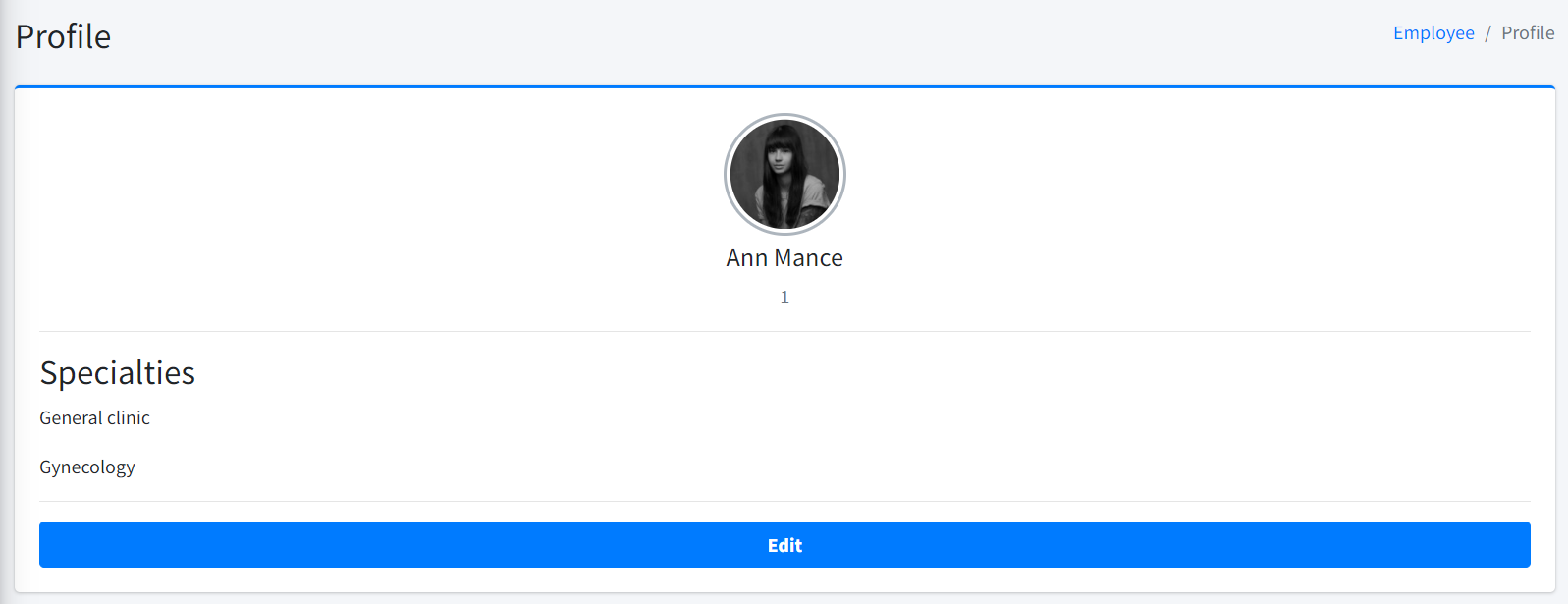
We should see something similar to the Figure 59:
We’re going to make some changes so we can select what specialties a professional has at the moment of adding and editing.
Let’s change the add method of EmployeeController:
public function add()
{
  if ($_SERVER["REQUEST_METHOD"] == 'POST') {
    $data = [
        'firstname' => $_POST["firstname"],
        'lastname' => $_POST["lastname"],
        'type' => $_POST["type"]
    ];

    $this->employee->load($data);
    $this->employee->save();

    $this->db = new db(CONFIG);

    $this->employee->id
        = $this->db->getConnection()->lastInsertId();

    $specialties = $_POST["specialties"];

    $this->employee->saveSpecialties($specialties);

    header('Location: ' . SITE_BASE . 'employee/index/');
    exit;
  }

  $this->db = new db(CONFIG);

  $specialties = $this->db->query(
    'SELECT * FROM specialties'
  );
  $this->view->setAction('add');
  $this->view->set('employee', $this->employee);
  $this->view->set('specialties', $specialties);
  $this->view->render();
}
And the edit method:
public function edit($id)
{
    if ($_SERVER["REQUEST_METHOD"] == 'POST') {
        $data = [
            'firstname' => $_POST["firstname"],
            'lastname' => $_POST["lastname"],
            'type' => $_POST["type"]
        ];


        $this->employee->load($data);
        $this->employee->save($id);
        $this->employee->id = $id;


        $specialties = $_POST["specialties"];


        $this->employee->saveSpecialties($specialties);

        header('Location: '.SITE_BASE.'employee/index/');
        exit;
    }


    $this->db = new db(CONFIG);

    $specialties = $this->db->query('SELECT *
        FROM specialties');
    $this->employee->loadModel($id);
    $this->view->setAction('edit');
    $this->view->set('employee', $this->employee);
    $this->view->set('specialties', $specialties);
    $this->view->render();
}
And in the _form.php, right before the submit button:
<div class="form-group">
  <?php $spec_ids = array_column(
    $employee->specialties, 'id'
  ) ?>
  <label for="specialties">Specialties:</label>
  <select name="specialties" id="specialties"
    class="form-control" multiple>
    <?php foreach($specialties as $specialty): ?>
      <option value="<?= $specialty['id'] ?>"
        <?php
          echo (
          in_array(
            $specialty['id'], $spec_ids)
            ) ? 'selected' : '' ?>>
        <?= $specialty['description'] ?>
      </option>
    <?php endforeach ?>
  </select>
</div>
array_column gives us an array with the values corresponding to the field pass as a second parameter.
With this in place, the add and edit functionality should work. But there is something not quite right yet.
In the add method we have these two lines:
$this->db = new db(CONFIG);

$this->employee->id = $this
    ->db
    ->getConnection()
    ->lastInsertId();
We are doing this, because we need the id assigned to the model to save the related specialties, but the id is not being set.
Let’s go to the base Model and the save method:
public function save($id = null)
{
  if ($id) {
    $result = $this->db->update(
      $this->data, $this->table, $this->key, $id
    );
  } else {
    $result = $this->db->insert(
      $this->data, $this->table
    );
  }

  return $result;
}
Change it like this:
public function save($id = null)
{
  if ($id) {
    $result = $this->db->update(
      $this->data, $this->table, $this->key, $id
    );
  } else {
    $result = $this->db->insert(
      $this->data, $this->table
    );
    $this->id = $this->db->getConnection()
      ->lastInsertId();
  }

  return $result;
}
Another problem in the add method, these two lines:
$this->db = new db(CONFIG);

$specialties = $this
    ->db
    ->query('SELECT * FROM specialties');
We shouldn’t be making a query when we could use the Specialty model. In the EmployeeController add this use sentence:
use App\models\Specialty as Specialty;
And this property:
private $specialties;
And then change the constructor:
public function __construct(
    Employee $employee,
    View $view,
    Specialty $specialties
)
{
    $this->employee = $employee;
    $this->view = $view;
    $this->specialties = $specialties;
}
We are making use of the dependency injection in order to avoid the new operator.
Now we can rewrite the add method as follows:
public function add()
{
    if ($_SERVER["REQUEST_METHOD"] == 'POST') {
        $data = [
            'firstname' => $_POST["firstname"],
            'lastname' => $_POST["lastname"],
            'type' => $_POST["type"]
        ];

        $this->employee->load($data);
        $this->employee->save();

        $specialties = $_POST["specialties"];

        $this->employee->saveSpecialties($specialties);

        header('Location: '.SITE_BASE.'employee/index/');
        exit;
    }

    $this->view->setAction('add');
    $this->view->set('employee', $this->employee);
    $this->view->set(
        'specialties', $this->specialties->all()
    );
    $this->view->render();
}
And the edit method:
public function edit($id)
{
    if ($_SERVER["REQUEST_METHOD"] == 'POST') {
        $data = [
            'id' => $id,
            'firstname' => $_POST["firstname"],
            'lastname' => $_POST["lastname"],
            'type' => $_POST["type"]
        ];


        $this->employee->load($data);
        $this->employee->save($id);


        $specialties = $_POST["specialties"];


        $this->employee->saveSpecialties($specialties);

        header('Location: '.SITE_BASE.'employee/index/');
        exit;
    }

    $this->employee->loadModel($id);
    $this->view->setAction('edit');
    $this->view->set('employee', $this->employee);
    $this->view->set(
        'specialties', $this->specialties->all()
    );
    $this->view->render();
}
Just to be sure, here is the complete code of the EmployeeController.
We can make another little refactor. In the Employee model, add this property:
private $specialty;
And modify the constructor:
public function __construct(
    string $table,
    Specialty $specialty
)
{
    $this->table = $table;
    $this->specialty = $specialty;


    parent::__construct($this->table, $this->db);
    $this->key = 'id';
}
We are relying now on dependency injection, and now we can rework the getSpecialties method:
public function getSpecialties()
{
    return $this->belongsToMany(
        $this->specialty,
        'employees_specialties',
        'employee_id',
        'specialty_id'
    );
}
And just to be sure, here is the updated Employee Model.
Patient Medical History
It’s time to start adding the structure and logic to register patients visits, that will compose their medical record.
Run the following sql sentence:
CREATE TABLE `visits` (
  `id` int(11) NOT NULL AUTO_INCREMENT,
  `appointmentid` int(11) DEFAULT NULL,
  `datetime` datetime DEFAULT NULL,
  `patientid` int(11) DEFAULT NULL,
  `doctorid` int(11) DEFAULT NULL,
  `complaints` text,
  `diagnosis` varchar(250) DEFAULT NULL,
  `prescription` text,
  PRIMARY KEY (`id`)
) ENGINE=InnoDB DEFAULT CHARSET=utf8;
Create the Visit model with the following content:
<?php
namespace App\models;

use SimpleMVC\core\Model as Model;

class Visit extends Model {
    public $id;
    private $appointmentid;
    private $datetime;
    private $patientid;
    private $doctorid;
    private $complaints;
    private $diagnosis;
    private $prescription;

    public function __construct()
    {
        $this->table = 'visits';


        parent::__construct($this->table, $this->db);
        $this->key = 'id';
    }

    public function setAppointmentId($appointmentid)
    {
        $this->appointmentid = $appointmentid;
    }

    public function setDateTime($datetime)
    {
        $this->datetime = $datetime;
    }

    public function setPatientId($patientid)
    {
        $this->patientid = $patientid;
    }

    public function setDoctortId($doctorid)
    {
        $this->doctorid = $doctorid;
    }

    public function setComplaints($complaints)
    {
        $this->complaints = $complaints;
    }

    public function setDiagnosis($diagnosis)
    {
        $this->diagnosis = $diagnosis;
    }

    public function setPrescription($prescription)
    {
        $this->prescription = $prescription;
    }

    public function getAppointmentId()
    {
        return $this->appointmentid;
    }

    public function getDatetime()
    {
        return $this->datetime;
    }

    public function getPatientId()
    {
        return $this->patientid;
    }

    public function getDoctorId()
    {
        return $this->doctorid;
    }

    public function getComplaints()
    {
        return $this->complaints;
    }

    public function getDiagnosis()
    {
        return $this->diagnosis;
    }

    public function getPrescription()
    {
        return $this->prescription;
    }
}
We need to make several changes to the Patient model in order to get the visits. First, add this use sentence:
use App\models\Visit as Visit;
Then add a private property:
private $visits;
And change the constructor like this:
public function __construct(string $table, Visit $visits)
{
    $this->table = $table;
    $this->visits = $visits;


    parent::__construct($this->table, $this->db);
    $this->key = 'id';
}
Lastly, the method that defines the relation with the Visit model:
public function getVisits()
{
    return $this->hasMany($this->visits, 'patientid');
}
Now it’s the turn of the PatientController. Modify the view method as follows:
public function view($id)
{
    $patient = $this->patient->loadModel($id);


    $scripts = <<<scripts
    $( document ).ready(function() {
        $('#visits-table').DataTable()
        .order( [ 1, 'desc' ] ).draw(false);
    });
    scripts;


    if ($patient) {
        $this->view->setAction('view');
        $this->view->set('patient', $patient);
        $this->view->render(true, $scripts);
    }
}
Pay attention to:
$scripts = <<<scripts
        $( document ).ready(function() {
            $('#visits-table').DataTable()
            .order( [ 1, 'desc' ] ).draw(false);
        });
        scripts;
We are initializing a datatable, but in this case, the ordering and searching capabilities won’t be provided on the server side. You could change this, of course, but we don’t expect that many records for a patient. The table will be displayed in the corresponding view.php file, so the next step is to change the view.php file. It’s too much code, so it’s better to give you the gist.
The relevant part is this:
<table id="visits-table" class="display"
    style="width:100%">
    <thead>
        <tr>
            <th>Datetime</th>
            <th>Complaints</th>
            <th>Diagnosis</th>
            <th>Prescription</th>
        </tr>
    </thead>
    <tbody>
        <?php foreach($patient->visits as $visit): ?>
            <tr>
                <td><?= $visit['datetime'] ?></td>
                <td><?= $visit['complaints'] ?></td>
                <td><?= $visit['diagnosis'] ?></td>
                <td><?= $visit['prescription'] ?></td>
            </tr>
        <?php endforeach; ?>
    </tbody>
</table>
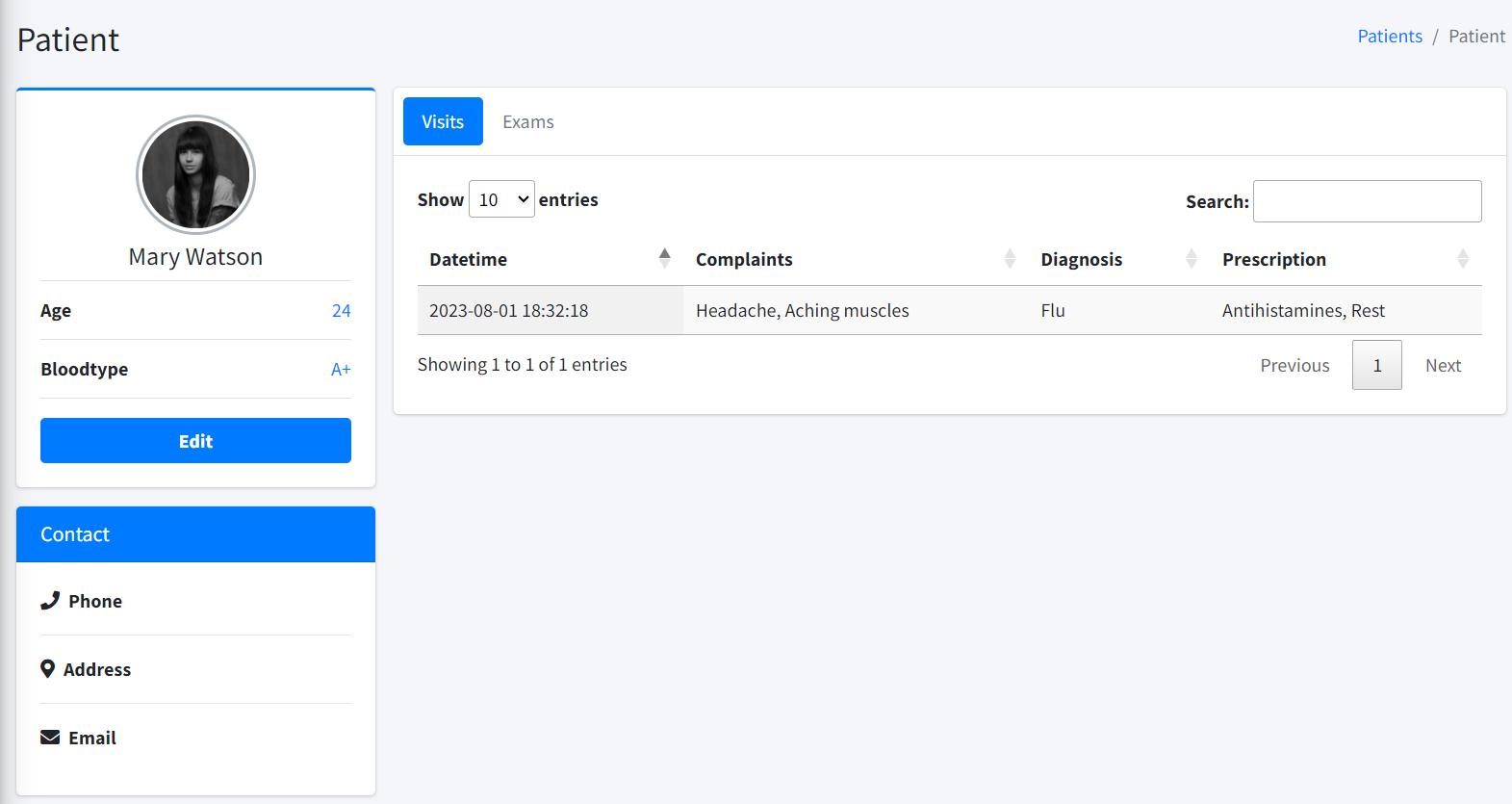
We are displaying a table with all the patient’s visits.
If you add some records to the visits table, you should see something similar to Figure 60:
Looks pretty good. We can add a New Visit button, let’s do that:
Right below:
<div class="active tab-pane" id="visits">
Add:
<div class="float-right">
    <button class="btn btn-success btn-sm mb-2"
        data-toggle="modal"
        data-target="#modal-visit">New Visit</button>
</div>
The button will toggle a modal that we need to add. Before the closing tag add the following:
<div class="modal fade" id="modal-visit">
<div class="modal-dialog">
<div class="modal-content">
<div class="modal-header">
<h4 class="modal-title">New Visit</h4>
<button type="button" class="close"
data-dismiss="modal" aria-label="Close">
<span aria-hidden="true">×</span>
</button>
</div>
<div class="modal-body">
<form id="visitForm">
<div class="form-group">
<input type="hidden"
name="patientid" id="patientid"
value="<?= $patient->id ?>"
class="form-control">
</div>
<div class="form-group">
<label for="complaints">
Complaints:
</label>
<input type="text"
name="complaints" id="complaints"
class="form-control" required>
</div>
<div class="form-group">
<label for="diagnosis">
Diagnosis:
</label>
<input type="text"
name="diagnosis" id="diagnosis"
class="form-control" required>
</div>
<div class="form-group">
<label for="prescription">
Prescription:
</label>
<textarea
name="prescription"
id="prescription"
rows="5"
class="form-control"
required>
</textarea>
</div>
<div class="form-group">
<label for="doctor">Doctor:</label>
<select
name="doctorid"
id="doctorid"
class="form-control" required>
<option
value="">--Select--</option>
<?php foreach($doctors as $doctor): ?>
<option value="<?= $doctor["id"] ?>">
<?= $doctor["fullname"] ?>
</option>
<?php endforeach; ?>
</select>
</div>
<div
class="modal-footer
justify-content-between">
<button type="button"
class="btn btn-default"
data-dismiss="modal">
Close
</button>
<button
type="submit"
class="btn btn-primary">
Save
</button>
</div>
</form>
</div>
</div>
<!-- /.modal-content -->
</div>
<!-- /.modal-dialog -->
</div>
<!-- /.modal -->
Here is the gist
The modal has a form that we’ll submit via ajax. It’s necessary to alter the view method of the PatientController to add the required scripts:
public function view($id)
    {
        $patient = $this->patient->loadModel($id);


        $scripts = <<<scripts
        function submitForm(table){
            $.ajax({
                type: "POST",
                url: "/patient/addvisit",
                cache:false,
                data: $('form#visitForm').serialize(),
                success: function(response){
                    data = JSON.parse(response);
                    table.row
                    .add([
                        data.datetime,
                        data.complaints,
                        data.diagnosis,
                        data.prescription
                    ])
                    .order( [ 1, 'desc' ] )
                    .draw(false);
                    $("#complaints").val("");
                    $("#diagnosis").val("");
                    $("#prescription").val("");
                    $("#doctorid").val("");
                    $("#modal-visit").modal('hide');
                },
                error: function(){
                    alert("Error");
                }
            });
        }
        $( document ).ready(function() {
            let table = $('#visits-table').DataTable();
            table.order( [ 1, 'desc' ] ).draw(false);
            $("#visitForm").submit(function(event){
                submitForm(table);
                return false;
            });
        });
        scripts;

        $this->db = new db(CONFIG);

        $doctors = $this
          ->db
          ->query("SELECT id,
            CONCAT(firstname, ' ', lastname) as fullname
            FROM employees WHERE type=1");

        if ($patient) {
            $this->view->setAction('view');
            $this->view->set('patient', $patient);
            $this->view->set('doctors', $doctors);
            $this->view->render(true, $scripts);
        }
    }
The ajax call sends a request to /patient/addvisit. We don’t have the addvisit method. Let’s create it:
public function addvisit()
{
    if ($_SERVER["REQUEST_METHOD"] == 'POST') {
        $data = [
            'appointmentid' => null,
            'datetime' => date('Y-m-d h:i:s'),
            'patientid' => $_POST["patientid"],
            'doctorid' => $_POST["doctorid"],
            'complaints' => $_POST["complaints"],
            'diagnosis' => $_POST["diagnosis"],
            'prescription' => $_POST["prescription"]
        ];

        $this->db = new db(CONFIG);

        $this->db->save($data, 'visits');

        echo json_encode($data);
    }
}
Go ahead and try to add a few records, they should appear at the top of the table. The code responsible is this:
table.row
.add([
   data.datetime,
   data.complaints,
   data.diagnosis,
   data.prescription
])
.order( [ 1, 'desc' ] )
.draw(false);
For now this is everything we need. Later we could include the patient exams but we have made a lot of progress.
Summary
In this chapter we’ve worked on the specialties CRUD, and linking professionals to one or more specialties. Then we built the logic behind adding new medical records for patients. In the process, we’ve added new capabilities to our framework, such as defining relations between models.
In the next chapter we’ll focus on registering appointments for patients. We’ll work on generating the doctors schedule, and then adding the functionalities to book appointments.