Chapter 13: Patients Appointments
Gestion de turnos de pacientes, disponibilidad profesional, calendario y generacion de horarios.
Introduction
In this chapter we’ll focus on two things: adding the functionality to generate the appointment slots for the doctors, and register appointments for the patients.
We’ll use fullcalendar to display and select available dates for patients visits. This widget is included in the AdminLTE template, so it’s reasonable to make use of it.
Availability table
This table will represent medical appointments. An appointment will have a doctorid, indicating the professional that will treat the patient, and a patientid indicating the patient to be treated. At first, the patientid will be null because the appointment will not be assigned to any patient. The structure is this:
CREATE TABLE `clinicmanagement`.`appointments` (
`id` INT NOT NULL AUTO_INCREMENT ,
`patientid` INT DEFAULT NULL ,
`doctorid` INT NOT NULL ,
`date` DATE NOT NULL ,
`start` DATETIME NOT NULL ,
`end` DATETIME NOT NULL , PRIMARY KEY (`id`)
) ENGINE = InnoDB;
Later we’ll need a tabla to store the doctors schedule (days and hours to work from monday to friday), and with that information generate the appointments records, originally without a patient assigned.
Before starting with the models and controllers, let’s add the necessary js files and style sheets to include fullcalendar and the select2 widget in the main layout.
Go to main.php and add these lines before the closing tag:
<!-- fullCalendar -->
<link rel="stylesheet"
href="plugins/fullcalendar/main.css">
<!-- Select2 -->
<link rel="stylesheet"
href="plugins/select2/css/select2.min.css">
<link rel="stylesheet"
href
='plugins/select2-bootstrap4-theme/select2-bootstrap4.min
.css'
>
Note: every css reference above should be one line in your code, I had to split them to avoid the text wordwrap.
And at the bottom of the page, after the SweetAlert2 script, add:
<!-- fullCalendar 2.2.5 -->
<script src="plugins/moment/moment.min.js"></script>
<script src="plugins/fullcalendar/main.js"></script>
<!-- Select2 -->
<script src="plugins/select2/js/select2.full.min.js">
</script>
Appointment model
Now we can start with the Appointment model:
<?php
namespace App\models;

use SimpleMVC\core\Model as Model;

class Appointment extends Model {
    public $id;
    private $doctorid;
    private $date;
    private $start;
    private $end;

    public function setDoctorId($doctorid)
    {
        $this->doctorid = $doctorid;
    }

    public function setDate($date)
    {
        $this->date = $date;
    }

    public function setStart($start)
    {
        $this->start = $start;
    }

    public function setEnd($end)
    {
        $this->end = $end;
    }

    public function getDoctorId()
    {
        return $this->doctorid;
    }

    public function getDate()
    {
        return $this->date;
    }

    public function getStart()
    {
        return $this->start;
    }

    public function getEnd()
    {
        return $this->end;
    }
}
Employee appointments relationship
In the Employee model, add the following use sentence:
use App\models\Appointment as Appointment;
And a private property:
private $appointments;
Then change the constructor as follows:
public function __construct(
    string $table,
    Specialty $specialty,
    Appointment $appointments
)
{
    $this->table = $table;
    $this->specialty = $specialty;
    $this->appointments = $appointments;


    parent::__construct($this->table, $this->db);
    $this->key = 'id';
}
Now we can define the relationship:
public function getAppointments()
{
    return
        $this->hasMany($this->appointments, 'doctorid');
}
Now, in EmployeeController the view method changes significantly. The code is very long, so I will give you the gist.
Let’s see what happens:
$slots = $this->employee->getAppointments();
We use the relationship to get all the appointments for the current professional. Then we loop through them adding javascript objects representing the events that the calendar needs:
$events = '';

foreach($slots as $slot) {
    $events .= "
        {
            id: " . $slot['id'] . ",
            title: '" . $slot['title'] . "',
            start:  new Date('".$slot['start']."'),
            end:  new Date('".$slot['end']."'),
            extendedProps: {
                patientid: '" . $slot['patientid'] . "'
            }
        },
    ";
}
id, title, start and end are standard properties of the event object that fullcalendar expects. We also add one extra property that we’ll use to assign the appointments.
Later in the calendar initialization we see how an array of events is defined:
events: [
    $events
]
Then we have a function that is called whenever the user clicks on an event:
eventClick:  function(info) {
endtime = moment(info.event.end)
.format('YYYY-MM-DD HH:mm:ss');
starttime = moment(info.event.start)
.format('YYYY-MM-DD HH:mm:ss');

if (info.event.title == 'AVAILABLE') {
  $('#modal-edit #modal-title')
  .html('Assign Appointment');
  $('#modal-edit #id').val(info.event.id);
  $('#modal-edit #action').val('edit');
  $('#modal-edit #start').val(starttime);
  $('#modal-edit #end').val(endtime);
  $('#modal-edit #patientid').val(null).trigger('change');
  $('#modal-edit #patientid').prop('disabled', false);
  $('#modal-edit #send').removeClass('btn-danger');
  $('#modal-edit #send').addClass('btn-primary');
  $('#modal-edit').modal('show');
} else {
  $('#modal-edit #modal-title')
  .html('Cancel Appointment');
  $('#modal-edit #id').val(info.event.id);
  $('#modal-edit #action').val('cancel');
  $('#modal-edit #start').val(starttime);
  $('#modal-edit #end').val(endtime);
  $('#modal-edit #patientid')
  .val(info.event.extendedProps.patientid)
  .trigger('change');
  $('#modal-edit #patientid').prop('disabled', true);
  $('#modal-edit #send').removeClass('btn-primary');
  $('#modal-edit #send').addClass('btn-danger');
  $('#modal-edit').modal('show');
}
}
info.event is an object that contains the information about the selected event. So, we use that information to populate:
Set the modal title accordingly, to indicate that we are assigning or canceling an appointment. Then we fill the fields of the form that goes inside the modal.
We need to change the view.php file of the employees folder. I’ll give you the gist to the complete view file
You can see the modal at the end of the file.
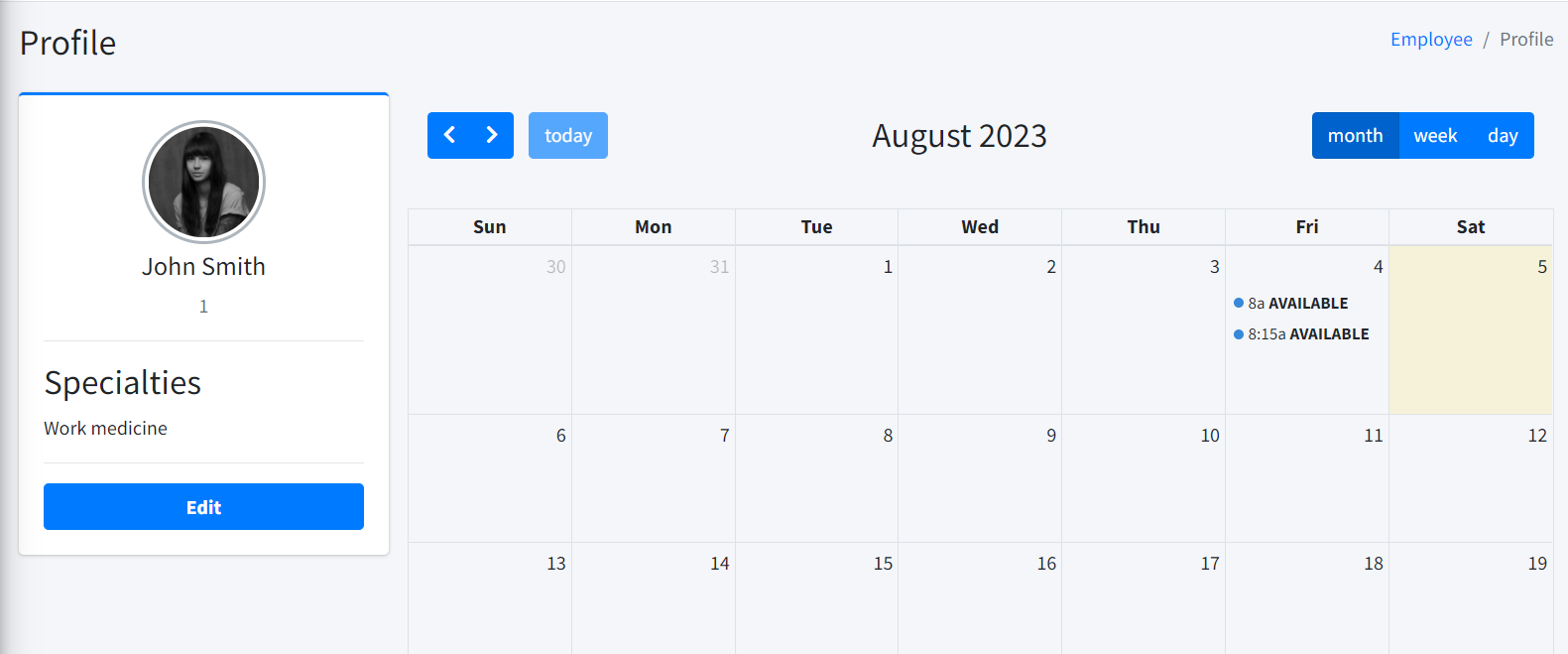
Insert a couple of records in the appointments table to test how it works. The value of patientid should be null, and the title as ‘AVAILABLE’ as shown in Figure 61.

Later, we’ll build an interface to generate this available appointments for a doctor.
The appointments should display in the calendar as shown in Figure 62.
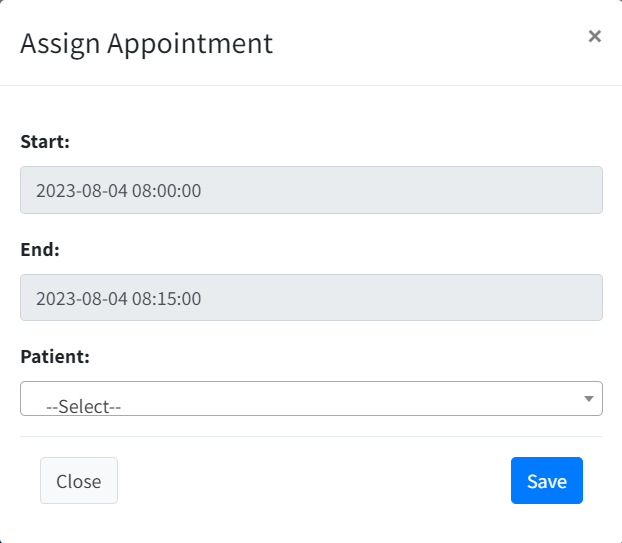
If you click on any of the available appoitntment, the modal will allow to select the patient to be assigned to the appointment (Figure 63).
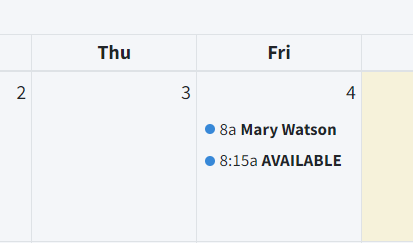
After the appointment was assigned, the name of the patient will be displayed as the title of the calendar event (Figure 64).
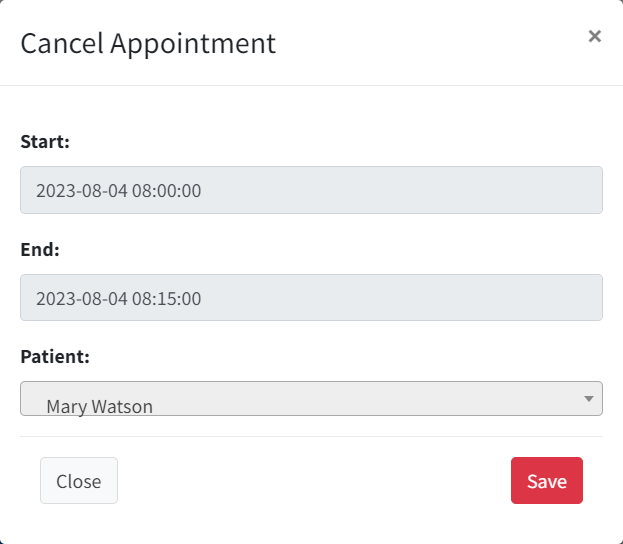
Clicking on an assigned appointment, shows the modal with the selected patient and dives the opportunity to cancel the appointment (Figure 65).
Working hours for professionals
Before we can generate the available appointments for the professionals, we need a table to store the working hours for everyone of them:
CREATE TABLE `availability` (
  `id` int(11) NOT NULL AUTO_INCREMENT,
  `doctorid` int(11) NOT NULL,
  `day` int(11) NOT NULL,
  `morning_start_shift` time DEFAULT NULL,
  `morning_end_shift` time DEFAULT NULL,
  `afternoon_start_shift` time DEFAULT NULL,
  `afternoon_end_shift` time DEFAULT NULL
);
The day field will store a value from 1 to 6, where 1 represents monday, 2 tuesday and so one.
Then we’ll make a change in the _form.php from the employees views folder, in order to display the fields to store the working hours. I’ll provide the gist of the complete file just in case.
The relevant part is this:
<ul class="nav nav-pills">
  <li class="nav-item"><a class="nav-link active"
    href="#monday" data-toggle="tab">Monday</a>
  </li>
  <li class="nav-item"><a class="nav-link"
    href="#tuesday" data-toggle="tab">Tuesday</a>
  </li>
  <li class="nav-item"><a class="nav-link"
    href="#wednesday" data-toggle="tab">Wednesday</a>
  </li>
  <li class="nav-item"><a class="nav-link"
    href="#thursday" data-toggle="tab">Thursday</a>
  </li>
  <li class="nav-item"><a class="nav-link"
    href="#friday" data-toggle="tab">Friday</a>
  </li>
  <li class="nav-item"><a class="nav-link"
    href="#saturday" data-toggle="tab">Saturday</a>
  </li>
</ul>
</div><!-- /.card-header -->
<div class="card-body">
<div class="tab-content">
<?php
 $days = array(
    'monday',
    'tuesday',
    'wednesday',
    'thursday',
    'friday',
    'saturday'
 );
?>
<?php foreach ($days as $day): ?>
  <div class="<?= ($day == 'monday') ? 'active' : '' ?>
    tab-pane" id="<?= $day ?>">
  <div class="form-group">
   <label for="<?= $day ?>"><?= ucfirst($day) ?>:</label>
   <input type="time" class="time-input"
    name="<?= $day ?>_m_start" step="900"
        inputmode="numeric"> to
  <input type="time" class="time-input"
    name="<?= $day ?>_m_end" step="900"
        inputmode="numeric"> (morning) |
   <input type="time" class="time-input"
    name="<?= $day ?>_a_start" step="900"
        inputmode="numeric"> to
   <input type="time" class="time-input"
    name="<?= $day ?>_a_end" step="900"
        inputmode="numeric"> (afternoon)
   </div>
</div>
<?php endforeach; ?>
</div>
<!-- /.tab-content -->
</div><!-- /.card-body -->
We display the days in tabs, and for each day we show four inputs to enter the working hours. If we edit one of the professionals, we should see something similar a what’s shown in figure 66:
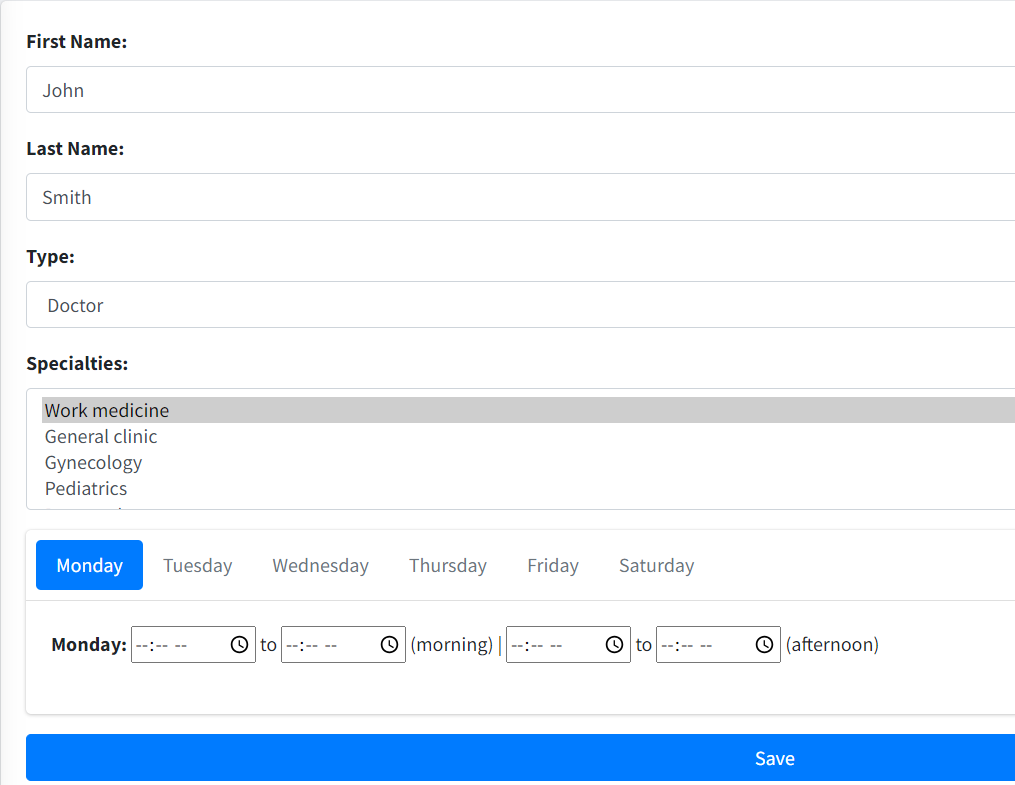
Let’s modify the edit method to process this data.
public function edit($id)
{
  if ($_SERVER["REQUEST_METHOD"] == 'POST') {
    $data = [
      'id' => $id,
      'firstname' => $_POST["firstname"],
      'lastname' => $_POST["lastname"],
      'type' => $_POST["type"]
    ];

    $this->employee->load($data);
    $this->employee->save($id);

    $specialties = $_POST["specialties"];

    $this->employee->saveSpecialties($specialties);

    $days = array(
      'monday',
      'tuesday',
      'wednesday',
      'thursday',
      'friday',
      'saturday'
    );

    $this->db = new db(CONFIG);

    $this->db->getConnection()->query(
      "DELETE FROM availability
      WHERE doctorid=".$this->employee->id
    );

    foreach ($days as $day) {
      $dayNumber = array_search($day, $days) + 1;

      $morning_start_shift = $_POST[$day . '_m_start'];
      $morning_end_shift = $_POST[$day . '_m_end'];
      $afternoon_start_shift = $_POST[$day . '_a_start'];
      $afternoon_end_shift = $_POST[$day . '_a_end'];

      if (
        $morning_start_shift != ''
        || $afternoon_start_shift != ''
      ) {

          $stmt = $this
              ->db
              ->getConnection()
              ->prepare(
                  "INSERT INTO availability
                  (day,
                  doctorid,
                  morning_start_shift,
                  morning_end_shift,
                  afternoon_start_shift,
                  afternoon_end_shift)
                  VALUES (?, ?, ?, ?, ?, ?)"
              );
            $stmt->execute(
              [
                $dayNumber,
                $this->employee->id,
                $morning_start_shift,
                $morning_end_shift,
                $afternoon_start_shift,
                $afternoon_end_shift
              ]
            );
      }
    }

    header('Location: ' . SITE_BASE . 'employee/index/');
    exit;
  }

  $this->employee->loadModel($id);
  $this->view->setAction('edit');
  $this->view->set('employee', $this->employee);
  $this->view->set(
    'specialties', $this->specialties->all()
  );
  $this->view->render();
}
Here is the gist
These are the exact lines we are adding:
$days = array(
    'monday', 'tuesday', 'wednesday', 'thursday',
    'friday', 'saturday'
);

$this->db = new db(CONFIG);


$this
  ->db
  ->getConnection()
  ->query("DELETE FROM availability
    WHERE doctorid=".$this->employee->id);

foreach ($days as $day) {
    $dayNumber = array_search($day, $days) + 1;

    $morning_start_shift = $_POST[$day . '_m_start'];
    $morning_end_shift = $_POST[$day . '_m_end'];
    $afternoon_start_shift = $_POST[$day . '_a_start'];
    $afternoon_end_shift = $_POST[$day . '_a_end'];

    if (
      $morning_start_shift != ''
      || $afternoon_start_shift != ''
    ) {

        $stmt = $this
          ->db
          ->getConnection()
          ->prepare("INSERT INTO availability (
            day,
            doctorid,
            morning_start_shift,
            morning_end_shift,
            afternoon_start_shift,
            afternoon_end_shift
          ) VALUES (?, ?, ?, ?, ?, ?)");
        $stmt->execute([
            $dayNumber,
            $this->employee->id,
            $morning_start_shift,
            $morning_end_shift,
            $afternoon_start_shift,
            $afternoon_end_shift
        ]);
    }
}
All of the above should look familiar. We obtain the connection, delete the records corresponding to the doctor, and then traverse the array of days with a foreach. The content of the inputs where no time has been entered we’ll arrive empty, so we need to check for that case.
You can try and add the working hours for the professionals. You will see the records in the table, although we won’t see them in the edit view. Don’t worry, we’ll fix that later.
Showing the hours already registered in the edit form
But we have so far works, but every time we select one professional to edit, we lose the working hours already entered.
We’ll fix this now.
Our first step is to create an Availability model. Add a file named Availability.php with the following content:
<?php
namespace App\models;

use SimpleMVC\core\Model as Model;

class Availability extends Model {
    public $id;
    private $doctorid;
    private $morning_start_shift;
    private $morning_end_shift;
    private $afternoon_start_shift;
    private $afternoon_end_shift;

    public function __construct()
    {
        $this->table = 'availability';


        parent::__construct($this->table, $this->db);
        $this->key = 'id';
    }

    public function getMorningStartShift()
    {
        return $this->morning_start_shift;
    }

    public function getMorningEndShift()
    {
        return $this->morning_End_shift;
    }

    public function getAfternoonStartShift()
    {
        return $this->afternoon_start_shift;
    }

    public function getAfternoonEndShift()
    {
        return $this->afternoon_end_shift;
    }
}
We’ve used this approach many times before. As you may have figured out, we’ll define a relationship between the new model and the Employee model. In models -> Employee.php, add the corresponding use sentence:
use App\models\Availability;
Then modify the constructor as follows:
public function __construct(
    string $table,
    Specialty $specialty,
    Appointment $appointments,
    Availability $availability
)
{
    $this->table = $table;
    $this->specialty = $specialty;
    $this->appointments = $appointments;
    $this->availability = $availability;


    parent::__construct($this->table, $this->db);
    $this->key = 'id';
}
We can now define the relationship:
public function getHours()
{
  return $this->hasMany($this->availability, 'doctorid');
}
Then, in the edit method, we can add the following line before rendering the view:
$this->view->set('hours', $this->employee->hours);
Just to be sure, here is the complete edit method
This takes care of editing an employee, but if we try to add one, we’ll see warnings regarding an undefined $hours variable.
We need to modify the add method. First, we add the line:
$this->view->set('hours', $this->employee->hours);
Of course, we also need to process the working hours selected for the professional. After this line:
$this->employee->saveSpecialties($specialties);
We need to add:
$days = array(
  'monday', 'tuesday', 'wednesday', 'thursday', 'friday',
  'saturday'
);

$this->db = new db(CONFIG);

$this->db->getConnection()->query(
    "DELETE FROM availability
    WHERE doctorid=".$this->employee->id
);


foreach ($days as $day) {
    $dayNumber = array_search($day, $days) + 1;

    $morning_start_shift = $_POST[$day . '_m_start'];
    $morning_end_shift = $_POST[$day . '_m_end'];
    $afternoon_start_shift = $_POST[$day . '_a_start'];
    $afternoon_end_shift = $_POST[$day . '_a_end'];

    if (
      $morning_start_shift != ''
      || $afternoon_start_shift != ''
    ) {

        $stmt = $this
            ->db
            ->getConnection()
            ->prepare(
                "INSERT INTO availability
                    (day,
                    doctorid,
                    morning_start_shift,
                    morning_end_shift,
                    afternoon_start_shift,
                    afternoon_end_shift)
                    VALUES (?, ?, ?, ?, ?, ?)"
            );
        $stmt->execute([
            $dayNumber,
            $this->employee->id,
            $morning_start_shift,
            $morning_end_shift,
            $afternoon_start_shift,
            $afternoon_end_shift
        ]);
    }
}
As you may have observed, there is a lot of code repetition. We can abstract the repeated functionality to another method. Add the following to EmployeeController:
private function saveAvailabilty($employee)
{
  $db = new db(CONFIG);


  $days = array(
    'monday',
    'tuesday',
    'wednesday',
    'thursday',
    'friday',
    'saturday'
  );

  $db->getConnection()->query("DELETE FROM availability
    WHERE doctorid=".$employee->id);

  foreach ($days as $day) {
    $dayNumber = array_search($day, $days) + 1;

    $morning_start_shift = $_POST[$day . '_m_start'];
    $morning_end_shift = $_POST[$day . '_m_end'];
    $afternoon_start_shift = $_POST[$day . '_a_start'];
    $afternoon_end_shift = $_POST[$day . '_a_end'];

    if (
      $morning_start_shift != ''
      || $afternoon_start_shift != ''
    ) {
      $stmt = $db
        ->getConnection()
        ->prepare(
            "INSERT INTO availability
            (
                day,
                doctorid,
                morning_start_shift,
                morning_end_shift,
                afternoon_start_shift,
                afternoon_end_shift
            )
            VALUES (?, ?, ?, ?, ?, ?)");
      $stmt->execute(
        [
            $dayNumber,
            $employee->id,
            $morning_start_shift,
            $morning_end_shift,
            $afternoon_start_shift,
            $afternoon_end_shift
        ]
      );
    }
  }
}
Now the add method is reduced significantly:
public function add()
{
    if ($_SERVER["REQUEST_METHOD"] == 'POST') {
        $data = [
            'firstname' => $_POST["firstname"],
            'lastname' => $_POST["lastname"],
            'type' => $_POST["type"]
        ];

        $this->employee->load($data);
        $this->employee->save();

        $specialties = $_POST["specialties"];

        $this->employee->saveSpecialties($specialties);

        $this->saveAvailabilty($this->employee);

        header('Location: '.SITE_BASE.'employee/index/');
        exit;
    }

    $this->view->setAction('add');
    $this->view->set('employee', $this->employee);
    $this->view->set(
        'specialties',
        $this->specialties->all()
    );
    $this->view->set('hours', $this->employee->hours);
    $this->view->render();
}
And the edit method:
public function edit($id)
{
    if ($_SERVER["REQUEST_METHOD"] == 'POST') {
        $data = [
            'id' => $id,
            'firstname' => $_POST["firstname"],
            'lastname' => $_POST["lastname"],
            'type' => $_POST["type"]
        ];

        $this->employee->load($data);
        $this->employee->save($id);

        $specialties = $_POST["specialties"];

        $this->employee->saveSpecialties($specialties);

        $this->saveAvailabilty($this->employee);

        header('Location: '.SITE_BASE.'employee/index/');
        exit;
    }

    $this->employee->loadModel($id);
    $this->view->setAction('edit');
    $this->view->set('employee', $this->employee);
    $this->view->set(
        'specialties', $this->specialties->all()
    );
    $this->view->set('hours', $this->employee->hours);
    $this->view->render();
}
Generating doctors available appointments
We have come very far, but now we need a way to generate the available appointments. In this occasion, we’ll start with the view. In the employees folder, add a file named appointments.php with the following content:
<?php
    $action = "Generate Doctor's Available Appointments";
    include '_form_header.php';
?>
<section class="content">
  <div class="container-fluid">
    <div class="card">
      <div class="card-body">
      <h2>Generate Doctor's Available Appointments</h2>
      <form
      action
      ="<?= SITE_BASE ?>employee/appointments/
      <?= $employee->id ?>"
        method="post">
        <input type="hidden" name="doctor_id"
          value="<?= $employee->id ?>">
        <div class="form-group">
          <label for="start_date">Start Date:</label>
          <input type="date" name="start_date"
            class="form-control">
        </div>
        <div class="form-group">
          <label for="end_date">End Date:</label>
          <input type="date" name="end_date"
            class="form-control">
        </div>
        <input type="hidden" name="appointment_duration"
          value="15">
        <button type="submit" class="btn btn-primary">
          Generate Available Appointments
        </button>
      </form>
      </div>
    </div>
  </div>
</section>
And here is the gist
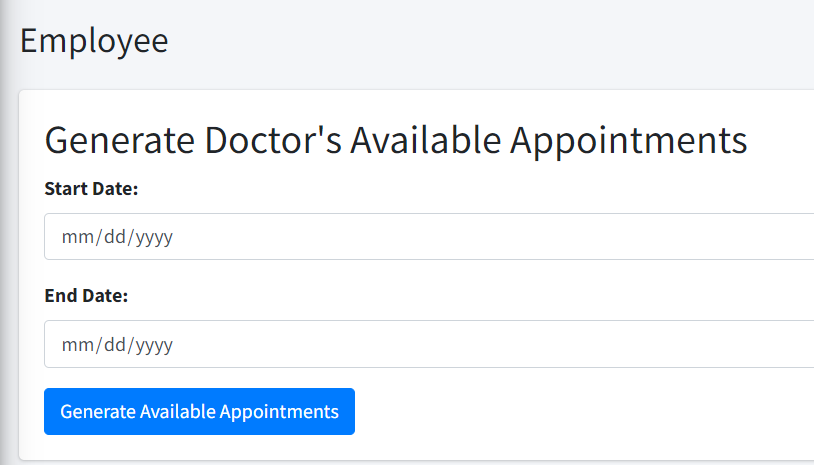
There is not much to it, we have two fields to enter the start and end dates, plus a hidden input holding the id of the doctor.
Then add this method to EmployeeController:
public function appointments($id)
{
  if ($_SERVER["REQUEST_METHOD"] == "POST") {
    // Retrieve form data
    $doctorId = $_POST["doctor_id"];
    $startDate = $_POST["start_date"];
    $endDate = $_POST["end_date"];
    $appointmentDuration = $_POST["appointment_duration"];

    $this->db = new db(CONFIG);
    $connection = $this->db->getConnection();

    // Call the function to generate appointments
    $this->saveAppointments(
      $connection,
      $doctorId,
      $startDate,
      $endDate,
      $appointmentDuration
    );

    header('Location: '.SITE_BASE.'employee/index/');
    exit;
  }

  $this->employee->loadModel($id);
  $this->view->setAction('appointments');
  $this->view->set('employee', $this->employee);
  $this->view->render();
}
The pattern is similar to other methods. If there is post, we process the data, if there is not post data, we render the view.
We don’t have the saveAppointments method yet. But if you write a blank method, such as:
private function saveAppointments(
        $connection,
        $doctor_id,
        $start_date,
        $end_date,
        $appointment_duration
    ) {}
There is no need for the method to be public, since it will only be called from another method.
If we visit http://clinicmanagement.test/employee/appointments/2 where the last number represents the id of an existing doctor, we should see the form presented in Figure 67:
We can complete the saveAppointments method now
private function saveAppointments(
    $connection,
    $doctor_id,
    $start_date,
    $end_date,
    $appointment_duration
)
{
  // Function to obtain the "Y-m-d H:i:s" format
  // given a date and time in "Y-m-d"
  // and "H:i:s" formats
  function getDateTimeFormat($date, $time) {
    return $date . ' ' . $time->format('H:i:s');
  }

  // Delete records for the doctor in the dates
  // range selected
  $connection->query("DELETE
    FROM appointments
    WHERE doctorid=$doctor_id
    AND date >= '$start_date'
    AND date <= '$end_date'");

  // Retrieve selected days and corresponding timings
  // from the database
  $db = new db(CONFIG);
  $selected_days_data = $db->query("SELECT *
    FROM availability
    WHERE doctorid = $doctor_id");

  // Loop through each selected day and generate
  // appointments
  foreach ($selected_days_data as $selected_day) {
    $weekday = $selected_day['day'];
    $morning_start_time
        = $selected_day['morning_start_shift'];
    $morning_end_time
        = $selected_day['morning_end_shift'];
    $afternoon_start_time
        = $selected_day['afternoon_start_shift'];
    $afternoon_end_time
        = $selected_day['afternoon_end_shift'];

    // Convert timings to DateTime objects
    $morning_start
        = DateTime::createFromFormat(
            'H:i', $morning_start_time
        );
    $morning_end
        = DateTime::createFromFormat(
            'H:i', $morning_end_time
        );
    $afternoon_start
        = DateTime::createFromFormat(
            'H:i', $afternoon_start_time
        );
    $afternoon_end
        = DateTime::createFromFormat(
            'H:i', $afternoon_end_time
        );

    // Loop through dates within the range
    $current_date = new DateTime($start_date);
    $end_date_obj = new DateTime($end_date);

    while ($current_date <= $end_date_obj) {
      $current_weekday = $current_date->format('N');

      // Check if the current weekday matches the selected weekday
      if ($current_weekday == $weekday) {
        // Get the date in "Y-m-d" format
        $current_date_str
        = $current_date->format('Y-m-d');

        // Generate morning appointments
        $morning_start
        = DateTime::createFromFormat(
            'H:i:s', $morning_start_time
        );
        $morning_end
        = DateTime::createFromFormat(
            'H:i:s', $morning_end_time
        );

        while ($morning_start < $morning_end) {
          $morning_end_minutes = clone $morning_start;
          $morning_end_minutes->modify(
            "+$appointment_duration minutes"
          );

          // Insert the record into the "Availability"
          // table
          $stmt = $connection
            ->prepare("INSERT INTO appointments (
            title,
            doctorid,
            date,
            start,
            end
          ) VALUES (?, ?, ?, ?, ?)");
          $stmt->execute([
            'AVAILABLE',
            $doctor_id,
            $current_date_str,
            getDateTimeFormat(
                $current_date_str, $morning_start
            ),
            getDateTimeFormat(
                $current_date_str, $morning_end_minutes
            )
          ]);

          // Move to the next appointment
          $morning_start = $morning_end_minutes;
        }

        // Generate afternoon appointments
        $afternoon_start
        = DateTime::createFromFormat(
            'H:i:s', $afternoon_start_time
        );
        $afternoon_end
        = DateTime::createFromFormat(
            'H:i:s', $afternoon_end_time
        );

        while ($afternoon_start < $afternoon_end) {
          $afternoon_end_minutes = clone $afternoon_start;
          $afternoon_end_minutes
            ->modify("+$appointment_duration minutes");

          // Insert the record into the "appointments"
          // table
          $stmt = $connection->prepare(
            "INSERT INTO appointments (
                title,
                doctorid,
                date,
                start,
                end
            ) VALUES (?, ?, ?, ?, ?)");
          $stmt->execute([
            'AVAILABLE',
            $doctor_id,
            $current_date_str,
            getDateTimeFormat(
                $current_date_str, $afternoon_start
            ),
            getDateTimeFormat(
                $current_date_str, $afternoon_end_minutes
            )
          ]);

          // Move to the next appointment
          $afternoon_start = $afternoon_end_minutes;
        }
      }

      // Move to the next day
      $current_date->modify('+1 day');
    }
  }
}
There are many lines of code, so it’s better if I provide you with the gist
Let’s see what happens here.
We have this function:
function getDateTimeFormat($date, $time)
{
    return $date . ' ' . $time->format('H:i:s');
}
It’s very simple, the only thing worth noting is that it’s a function living inside another function. We do this because this function only has meaning in the context of the method, so we don’t need to be able to call it from anywhere else.
The next lines are commented for clarity, we delete the appointments in the range of the selected dates and read the data with the information of the working hours of the doctor.
Then we use a foreach to iterate through the working days and hours of the professional.
For each of these days, we go from the start date to the end date, which are the values entered in the form.
We use this:
$current_weekday = $current_date->format('N');
To take a number representing the current day (1 for monday, 2 for tuesday and so on).
If the current day matches the day of the outer foreach, then we need to generate the available appointments for the morning and afternoon shifts.
This gives us two other while loops, where the records are actually inserted.
It may take you a while, but you should be able to follow the code.
We’ll be adding a button linking to this appointments generator. Open the view.php file in the employees folder.
After this line:
<a href="employee/edit/<?= $employee->id ?>"
class="btn btn-primary btn-block"><b>Edit</b></a>
Add this:
<hr>
<a
  href="employee/appointments/<?= $employee->id ?>"
  class="btn btn-info btn-block">
  <b>Generate Appointments</b>
</a>
Put the new route to test, enter two dates to generate the available appointments. Now return to the professional and you should see something similar to the Figure 68:
!Generated available appointments](13-8-generated-appointments.png)
We’ll finish the chapter with the gists to the relevant files so you can check that everything works.
Summary
In this chapter we focused on two things: adding the functionality to generate the appointment slots for the doctors, and registering appointments for the patients.
We used fullcalendar to display and select available dates for patients visits. Finally, we built the appointments generator.
We still have work to do, but we’ve come a long way. The next chapter will deal with protecting all the routes, providing a way to upload a profile image, and developing the sidebar menu.