Chapter 14: Routing
Proteccion de rutas, configuracion de rutas, rutas nombradas y resolucion de URLs dentro del framework.
Introduction
In this chapter, we’ll focus on two topics. First, protecting all of our routes. At the moment, we can visit any place part of our application without the need of logging in. This is of course both unintended and insecure. Second, we have a matching mechanism for our routes that works but is somehow inflexible. We extract the name of the controller and action from the url. Most of the modern frameworks such as Laravel, use a file with the configuration for the routes. The file is called routes.php and allows to map url fragments to controllers, and even to name the routes.
Protecting our routes
If we go back to chapter 8, we’ll remember that the index method of the SiteController required an authenticated user. We accomplished that using a helper called SessionChecker. Let’s revisit the method:
public function index()
{
  SessionChecker::check();

  $this->view->setAction('index');
  $this->view->render();
}
The static method check has the following content:
public static function check() {
  session_id(APP_SESSION_ID);
  session_start();


  if (!isset($_SESSION["username"])) {
      header('Location: '.SITE_BASE.'user/login');
      exit;
  }


  if (time() - $_SESSION["login_time_stamp"] > 3600) {
      session_unset();
      session_destroy();
      header('Location: '.SITE_BASE.'user/login');
      exit;
  }
}
We start the session identified with the constant APP_SESSION_ID, and check the session variables for a logged in user.
We should enforce such a control in our EmployeeController and in our PatientController.
Let’s go to http://clinicmanagement.test/employee/index
Accessing the menu containing the Logout option, we get the warnings shown in Figure 69.
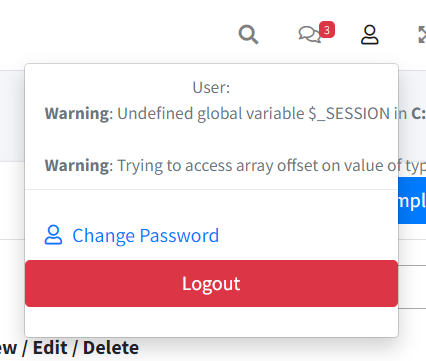
It is expected, since we are trying to access session variables that are not defined.
Taking the example of the SiteController, we need to add the following use sentence in the EmployeeController:
use SimpleMVC\helpers\SessionChecker;
Now we need to add the call to the static method check() of the SessionChecker helper, but, where?
Well, since the access restriction should apply to every method, it’s probably a good idea add the following line to the constructor:
SessionChecker::check();
Now trying to access http://clinicmanagement.test/employee/index should take us to the login page.
The same goes for the PatientController.
Routes configuration
We’ll start by adding a file with the definition of the routes. The routes are application specific, it’s reasonable to create the file in the application folder, as shown in Figure 70.

Put the following content:
<?php
$routes = [
'/' => [
    'controller' => 'SiteController', 'action' => 'index'
    ],
'/site/index' => [
    'controller' => 'Site', 'action' => 'index'
    ],
'/user/login' => [
    'controller' => 'User', 'action' => 'login'
    ],
'/user/logout' => [
    'controller' => 'User', 'action' => 'logout'
    ],
'/employee' => [
    'controller' => 'Employee', 'action' => 'index'
    ],
'/employee/index' => [
    'controller' => 'Employee', 'action' => 'index'
    ],
'/employee/data' => [
    'controller' => 'Employee', 'action' => 'data'
    ],
'/employee/view/{id}' => [
    'controller' => 'Employee', 'action' => 'view'
    ],
];
It’s an associative array, with the application routes as the keys, and the pair controller-action as the values.
Note that for /employee/view/{id} we use a placeholder, since the id will vary.
Now we need to make some adjustments in our Application class, specifically in the run method.
Comment out or delete these lines:
$url = explode('/', $url);
$controller = array_shift($url);
$controllerClass = 'App\\controllers\\'
    . ucwords($controller) . 'Controller';
$action = array_shift($url);
$queryString = $url;
And replace them with the following:
include_once ROOT . DIRECTORY_SEPARATOR
    . 'application/routes.php';

$route_defined = false;

foreach ($routes as $route => $routeInfo) {
  $pattern = str_replace('/', '\/', $route);
  $pattern = preg_replace(
    '/{([a-zA-Z]+)}/', '([^\/]+)', $pattern
  );
  if (
    preg_match('/^' . $pattern . '$/', '/'.$url, $matches)
    ) {
    $controller = $routeInfo['controller'];
    $controllerClass = 'App\\controllers\\'
        . $controller . 'Controller';
    $action = $routeInfo['action'];
    $queryString = array_slice($matches, 1);
    $route_defined = true;
    break;
  }
}

if (!$route_defined) {
  $response = new Response();
  $response->setResponseHeader(404, 'Not found');
}
Let’s analyze these two lines:
$pattern = str_replace('/', '\/', $route);
$pattern = preg_replace(
    '/{([a-zA-Z]+)}/', '([^\/]+)', $pattern
    );
$pattern = str_replace('/', '\/', $route);
This line is used to escape any forward slashes (/) that may be present in the route. This is important when using the preg_match function later, as the forward slash character is used as a delimiter in regular expressions. By escaping the forward slash with /, you ensure that the preg_match function works properly when searching for matches with the route.
$pattern = preg_replace(
    '/{([a-zA-Z]+)}/', '([^\/]+)', $pattern
    );
This line uses the preg_replace function to replace any route parameters with a more general matching pattern in the route. In this case, it's looking for a matching pattern that matches any sequence of alphabetic characters, and then replacing it with ([^/]+), which matches any sequence of characters that does not contain a forward slash. This allows the route to match various types of dynamic segments, such as IDs or parameter names, rather than being restricted to just letters.
By making these transformations in the route pattern, you can ensure that the preg_match function can properly find and handle routes with dynamic parameters, allowing you to create more flexible and powerful routes in your application.
If you visit for example http://clinicmanagement.test/employee/index nothing has changed. You can go and view the details of any employee. But if you try to edit then you’ll get the error shown in Figure 71:
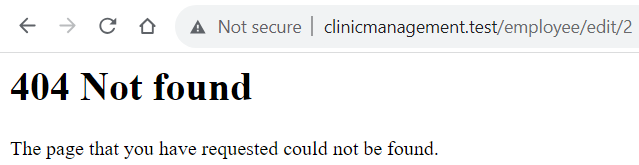
This is to be expected, because our routes.php file doesn’t have the necessary route definition. Let’s add it:
'/employee/edit/{id}' => [
    'controller' => 'Employee', 'action' => 'edit'
    ],
Now you should see the form.
You may be wondering if it’s worth the trouble of defining every route of our application, especially since there is a correspondence between the routes and the controller actions.
In my opinion, the answer depends upon the complexity of your application, but the approach of a route file is more flexible and is the one used in frameworks such as Laravel. In the case of Laravel, the advantages are clearer because of the use of named routes
Named routes
In Laravel, and other frameworks, there is something called named routes. Basically, the concept is to assign a name to a route, which can be different from the url. Think or named routes as an alias. What are the advantages? Well, let’s see an example.
We have the url employee/view/{id}. We have different parts in our application where we are referencing this route. At some point, we decide that it’s better to define the url as employee/show/{id}. Now we have to look in our code and change all the references.
But, if you use a name for a route, you can leave the alias as it is and change the route definition as you like.
Go to the routes.php file and change the $routes array like this:
$routes = [
  '/' => ['url' => '/', 'controller' => 'Site',
    'action' => 'index'],
  'home' => ['url' => '/site/index', 'controller' => 'Site',
    'action' => 'index'],
  'user.login' => ['url' => '/user/login',
    'controller' => 'User', 'action' => 'login'],
  'user.logout' => ['url' => '/user/logout',
    'controller' => 'User', 'action' => 'logout'],
  'employee' => ['url' => '/employee/index',
    'controller' => 'Employee', 'action' => 'index'],
  'employee.list' => ['url' => '/employee/index/',
    'controller' => 'Employee', 'action' => 'index'],
  'employee.data' => ['url' => '/employee/data',
    'controller' => 'Employee', 'action' => 'data'],
  'employee.view' => ['url' => '/employee/view/{id}',
    'controller' => 'Employee', 'action' => 'view'],
  'employee.edit' => ['url' => '/employee/edit/{id}',
    'controller' => 'Employee', 'action' => 'edit'],
];
As you can see, the keys of the arrays are the names of the routes. Then we have the values as arrays with url, controller and action.
Then we need to change the foreach like this:
foreach ($routes as $name => $routeInfo) {
  $pattern = str_replace('/', '\/', $routeInfo['url']);
  $pattern = preg_replace(
    '/{([a-zA-Z]+)}/', '([^\/]+)', $pattern
    );
  if (
    preg_match('/^' . $pattern . '$/', '/'.$url, $matches)
    ) {
      $controller = $routeInfo['controller'];
      $controllerClass = 'App\\controllers\\'
        . $controller . 'Controller';
      $action = $routeInfo['action'];
      $queryString = array_slice($matches, 1);
      $route_defined = true;
      break;
  }
}
In fact, the only change foreach ($routes as $name => $routeInfo) is instead of foreach ($routes as $routeInfo)
Now, how can we use the name of a route?
Let’s take for example the employee edit form definition:
We need to replace the action with the alias, along with a method to retrieve the url. We can accomplish that with another class.
Create a new file in simplemvc -> helpers named Route.php with the following content:
<?php
namespace SimpleMVC\helpers;

class Route
{
  public static function getUrl(
    $routeName, $parameters = []
    )
  {
    include ROOT . DIRECTORY_SEPARATOR
        . 'application/routes.php';

    if (array_key_exists($routeName, $routes)) {
      $url = $routes[$routeName]['url'];

      if (count($parameters) > 0) {
        $urlParts = explode('/', $url);
        foreach ($urlParts as $key => $part) {
          if (strpos($part, '{')
            !== false && strpos($part, '}')
            !== false) {
              $urlParts[$key] = array_shift($parameters);
          }
        }
        $url = implode('/', $urlParts);
      }

      return $url;
    } else {
      return '/';
    }
  }
}
Here is the gist
In the only method, we include the routes files, then we check the existence of the route name which is the key of the routes array. If the name exists we extract the url from the value, and divide it in parts. The only thing that could look strange is this line:
if (
    strpos($part, '{')
        !== false && strpos($part, '}')
        !== false
    )
We are checking if the url fragment starts and finishes with curly braces, which indicates that is a placeholder. If it’s a placeholder, we extract the value from the parameters array.
In this way we can accommodate a variable number of parameters.
Now, one thing to remember is that we are using composer and PSR-4 for the autoloading of classes. So, in order for this new class to be available we need to open the terminal at the root of the project and run:
composer dump-autoload
Now, in our View class, we need to add the following line:
use SimpleMVC\helpers\Route as Route;
And in the render method, after this line:
extract($this->variables);
Add the following:
$route = new Route();
Then, going back to the edit form, we can change the form definition as:
<form
  action="<?php echo $route::getUrl(
    'employee.edit', [$employee->id]); ?>"
  method="POST">
Everything should work as expected. Just to be sure, here is the complete code of the Application class
I hope you can see the advantages of using a file to define the routes, and we can take it even harder.
We’ll add a new method called match to our Route class, to take away a big part of the complexity of the run method in the Application class:
public static function match($url, $routes)
{
  $result = [
    'controller' => null,
    'controllerClass' => null,
    'action' => null,
    'queryString' => null,
    'route_defined' => false
  ];


  foreach ($routes as $name => $routeInfo) {
    $pattern = str_replace('/', '\/', $routeInfo['url']);
    $pattern = preg_replace(
        '/{([a-zA-Z]+)}/', '([^\/]+)', $pattern
        );
    if (
    preg_match('/^' . $pattern . '$/', '/' . $url, $matches)
    ) {
      $result['controller'] = $routeInfo['controller'];
      $result['controllerClass'] = 'App\\controllers\\'
      . $routeInfo['controller'] . 'Controller';
      $result['action'] = $routeInfo['action'];
      $result['queryString'] = array_slice($matches, 1);
      $result['route_defined'] = true;
      break;
    }
  }


  if (!$result['route_defined']) {
    $response = new Response();
    $response->setResponseHeader(404, 'Not found');
  }

  return $result;
}
And we need to add this sentence:
use SimpleMVC\core\Response as Response;
We are using the logic that was in the run method of the Application class. Now, we can add this sentence to the Application class:
use SimpleMVC\helpers\Route as Route;
And then we can replace these lines:
$route_defined = false;

foreach ($routes as $name => $routeInfo) {
  $pattern = str_replace('/', '\/', $routeInfo['url']);
  $pattern = preg_replace(
    '/{([a-zA-Z]+)}/', '([^\/]+)', $pattern
    );
  if (
    preg_match('/^' . $pattern . '$/', '/'.$url, $matches)
    ) {
    $controller = $routeInfo['controller'];
    $controllerClass = 'App\\controllers\\'
        . $controller . 'Controller';
    $action = $routeInfo['action'];
    $queryString = array_slice($matches, 1);
    $route_defined = true;
    break;
  }
}


if (!$route_defined) {
  $response = new Response();
  $response->setResponseHeader(404, 'Not found');
}
With this line:
extract(Route::match($url, $routes));
Again, just to be sure, here is the code of the run method
Now we could go even farther and use the match method to define the allowed http method for every route. It’s an exercise that I leave to you, dear reader.
Finally, you may still prefer the simpler original routing mechanism. Go to the config folder and the config.php file. After this line:
define('DEVELOPMENT_ENVIRONMENT', true);
Add this one:
define('ROUTER', false);
Then in the run method of the Application class we can replace:
include_once ROOT . DIRECTORY_SEPARATOR
    . 'application/routes.php';

extract(Route::match($url, $routes));
With:
if (ROUTER) {
  include_once ROOT . DIRECTORY_SEPARATOR
    . 'application/routes.php';

  extract(Route::match($url, $routes));
} else {
  $url = explode('/', $url);
  $controller = array_shift($url);
  $controllerClass = 'App\\controllers\\'
    . ucwords($controller) . 'Controller';
  $action = array_shift($url);
  $queryString = $url;
}
Now we can decide which method of routing is better for our app.
Summary
This was a brief chapter. We are approaching the end of the book. We accomplished the goal of protecting our routes, thanks to the helper class, and then we went to define a robust routing mechanism. In the next chapter, we’ll deal with authorization, through role based access control (RBAC), and we’ll finish the sidebar menu, wrapping up our application.