Chapter 15: Role based access control
Control de acceso basado en roles, ajustes de usuarios, vistas finales y cierre del libro.
Introduction
We’ve come a long way, and still, there are many things to be done. Some of these things I will leave to you, dear reader, but we need to tackle the issue of authorization.
Authentication means to identify the user, and we already have the mechanism in place. Authorization, on the other hand, means to decide what parts of the application a user can access based on their identity.
To that end, we can use role based access control (RBAC) which grants authorization to a user group based on their role.
Roles table
We need a roles table, here is the sentence you can use to create it:
CREATE TABLE roles (
    id INT AUTO_INCREMENT PRIMARY KEY,
    role_name VARCHAR(255) NOT NULL,
    description TEXT,
    created_at TIMESTAMP DEFAULT CURRENT_TIMESTAMP,
    updated_at TIMESTAMP DEFAULT CURRENT_TIMESTAMP
    ON UPDATE CURRENT_TIMESTAMP
);
We also need to establish a relation between users and roles, and this opens a question. Does a user need more than one role in the context of our application? If the answer is yes, then we need a pivot table, users_roles. But if a user can have only one role, we need a field role_id in our users table.
Our application we’ll manage a single role per user, so here is the sentence to add a field to the users table.
ALTER TABLE users
ADD role_id INT AFTER confirmed_at;
Go ahead and add one record to the roles table:
INSERT INTO `roles` (
`id`,`role_name`,`description`,`created_at`,`updated_at`
)
VALUES (
'1','Admin','Admin',current_timestamp(),
current_timestamp()
);
Now choose one of the users and change the value of role_id to 1.
Changing the UserController
Currently our UserController has methods to logging in and out, and registering users. We’ll add the methods to list, view, add, edit and delete users.
Add the index method:
public function index()
{
  $dataTable = new DataTable(
    ['username', 'email', 'role_id', 'id'], 'id', 'users'
    );

  $this->view->setAction("index");
    $this->view->set('grid', $dataTable);

  $scripts = <<<scripts
  $( document ).ready(function() {
   table = $('#data-table').DataTable({
      "ajax":{
        url :"/user/data", // json datasource
        type: "post"  // type of method, GET/POST/DELETE
      },
      columns: [
        {"data": 0},{"data": 1},{"data": 2}, {
          data: null,
          orderable: false,
          searchable: false,
          className: "center",
          render: function (data, type, full, meta) {
              return '<a href="/user/view/'+data[3]
                +'" title="View">View</a>' + ' ' +
                '<a href="/user/edit/'+data[3]
                +'" title="Edit">Edit</a>' + ' '
                +'<a href="javascript: void(0);"
                title="Delete"
                onclick="del('+data[3]+')">Delete</a>';
          }
        }
      ]
   });
  });
  scripts;
  return $this->view->render(true, $scripts);
}
Here is the gist
And of course, we need the data method:
public function data()
{
  $params = $_REQUEST;

  $where = "";

  $columns = array(
    0 =>'username',
    1 =>'email',
    2 =>'role_id',
    3 =>'id'
  );

  $data = [];

  $queryTot =
  $queryRec = "SELECT username, email, role_id, id
  FROM users";


  // check search value exist
  if( !empty($params['search']['value']) ) {
    $where .=" WHERE ";
    $where .=" ( username LIKE '"
      .$params['search']['value']."%' ";
    $where .=" OR email LIKE '"
      .$params['search']['value']."%' ";
    $where .=" OR role_id LIKE '"
      .$params['search']['value']."%' )";

    $queryTot .= $where;
    $queryRec .= $where;
  }

  if( !empty($params['order'][0]) ) {
    $queryRec .=
    " ORDER BY "
    . $columns[$params['order'][0]['column']]." "
    .$params['order'][0]['dir']
    ." LIMIT ".$params['start']." ,"
    .$params['length']." ";
  }

  $this->db = new db(CONFIG);

  $users = $this->db->query($queryRec);

  foreach ($users as $user) {
    foreach ($user as $key => $value) {
      $item[] = $value;
    }
    $data[] = $item;
    $item = [];
  }

  $totalRecords = count($this->db->query($queryTot));

  $draw =
  (!empty($params['draw']) )
  ? intval( $params['draw']) : false;

  $json_data = array(
    "draw"            => $draw,
    "recordsTotal"    => intval( $totalRecords ),
    "recordsFiltered" => intval($totalRecords),
    "data"            => $data   // total data array
  );

  echo json_encode($json_data);
  exit;
}
And the gist
Now it’s the turn of the views. There is already a users folder. Go ahead and add the index.php file:
<section class="content-header">
  <div class="container-fluid">
  <div class="row mb-2">
    <div class="col-sm-6">
      <h1>Users</h1>
    </div>
  </div>
  </div><!-- /.container-fluid -->
</section>
<section class="content">
  <div class="container-fluid">
    <div class="card">
      <div class="card-header">
        <h3 class="card-title">Users</h3>
        <div class="float-right">
          <a href="<?= SITE_BASE ?>user/add"
            class="btn btn-primary">New User</a>
        </div>
      </div>
      <div class="card-body">
        <?php $grid->render(); ?>
      </div>
    </div>
  </div>
</section>
And again the gist
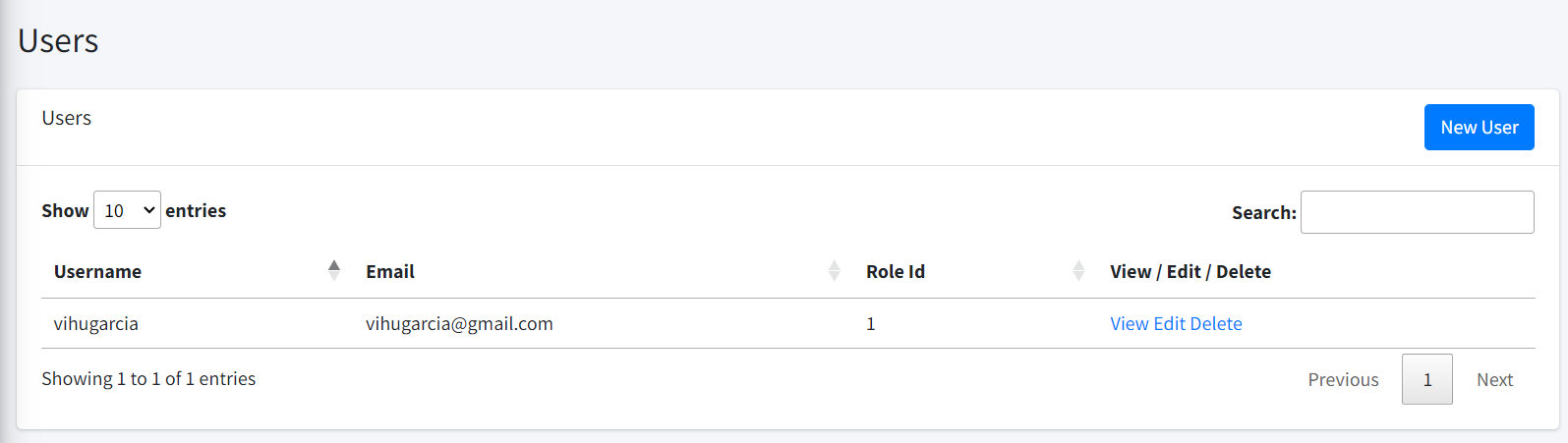
If we visit http://clinicmanagement.test/user/index we should be able to see users list as shown in Figure 72:
Finally the rest of the method:
public function view($id)
  {
    $user = $this->user->loadModel($id);

    if ($user) {
      $this->view->setAction('view');
      $this->view->set('user', $user);
      $this->view->render();
    }
  }


  public function add()
  {
    if ($_SERVER["REQUEST_METHOD"] == 'POST') {
      if (!empty($_POST["password"])) {
        $data = [
            'username' => $_POST["username"],
            'email' => $_POST["email"],
            'password' => password_hash(
              $_POST["password"], PASSWORD_BCRYPT
              ),
            'role_id' => $_POST["role_id"]
        ];


        if ($_POST["password"]
        != $_POST["confirm_password"]) {
          $msg = "Password and Confirmed Password
          doesn't match";
          $this->user->load($data);
          $this->view->setAction('add');
          $this->view->set('user', $this->user);
          $this->view->set('msg', $msg);
          $this->view->render();
          exit;
        }
      } else {
        $data = [
            'username' => $_POST["username"],
            'email' => $_POST["email"],
            'role_id' => $_POST["role_id"]
        ];
      }

        $this->user->load($data);
        $this->user->save();

        header('Location: ' . SITE_BASE . 'user/index/');
        exit;
    }

    $this->view->setAction('add');
    $this->view->set('user', $this->user);
    $this->view->render();
  }

  public function edit($id)
  {
    if ($_SERVER["REQUEST_METHOD"] == 'POST') {
      if (!empty($_POST["password"])) {
        $data = [
          'email' => $_POST["email"],
          'password' => password_hash(
            $_POST["password"], PASSWORD_BCRYPT
            ),
          'role_id' => $_POST["role_id"]
        ];

        if ($_POST["password"]
        != $_POST["confirm_password"]) {
          $msg = "Password and Confirmed Password
          doesn't match";
          $this->user->load($data);
          $this->view->setAction('edit');
          $this->view->set('user', $this->user);
          $this->view->set('msg', $msg);
          $this->view->render();
          exit;
        }
      } else {
        $data = [
          'email' => $_POST["email"],
          'role_id' => $_POST["role_id"]
        ];
      }

      $this->user->load($data);
      $this->user->save($id);

      header('Location: ' . SITE_BASE . 'user/index/');
      exit;
    }

    $this->user->loadModel($id);
    $this->view->setAction('edit');
    $this->view->set('user', $this->user);
    $this->view->render();
  }

  public function delete($id)
  {
    if (!isset($_REQUEST["id"])) {
      echo "error";
    } else {
      if ($this->user->del("id", $_REQUEST["id"])) {
        echo "success";
      } else {
        echo "error";
      }
    }
    exit;
  }
We don’t have the view files, but before we need to change the User model.
<?php
namespace App\models;

use SimpleMVC\core\Model as Model;

class User extends Model {
  public $id;
  private $username;
  private $email;
  private $password;
  private $confirmed_at;
  private $role_id;


  public function __construct(string $table)
  {
    $this->table = $table;

    parent::__construct($this->table, $this->db);
    $this->key = 'id';
  }

  public function setUserName(String $username)
  {
    $this->username = $username;
  }

  public function getUserName()
  {
    return $this->username;
  }

  public function setEmail(String $email)
  {
    $this->email = $email;
  }

  public function setConfirmed_at($confirmed_at)
  {
    $this->confirmed_at = $confirmed_at;
  }

  public function setRole_id(int $role_id)
  {
    $this->role_id = $role_id;
  }

  public function getEmail()
  {
    return $this->email;
  }

  public function setPassword($password)
  {
    $this->password;
  }

  public function getPassword()
  {
    return $this->password;
  }

  public function getConfirmet_at()
  {
    return $this->confirmed_at;
  }

  public function getRole_id()
  {
    return $this->role_id;
  }
}
With this in place, we can work with the rest of the views
Finishing the views
_user_header.php
<!-- Content Header (Page header) -->
<section class="content-header">
  <div class="container-fluid">
  <div class="row mb-2">
    <div class="col-sm-6">
    <h1>User</h1>
    </div>
    <div class="col-sm-6">
    <ol class="breadcrumb float-sm-right">
      <li class="breadcrumb-item">
        <a href="user/index">Users</a>
      </li>
      <li class="breadcrumb-item active">
      <?= $action ?>
      </li>
    </ol>
    </div>
  </div>
  </div><!-- /.container-fluid -->
</section>
_form.php
<?php if ($action == "Add"): ?>
<div class="form-group">
  <label for="username">Username:</label>
  <input type="text" name="username"
  class="form-control" value="<?= $user->username ?>">
</div>
<?php endif; ?>
<div class="form-group">
  <label for="email">Email:</label>
  <input type="text" name="email"
  class="form-control" value="<?= $user->email ?>">
</div>
<div class="form-group">
  <label for="password">Password:</label>
  <input type="password" name="password"
  class="form-control" value=""
  <?php echo ($action == 'Add') ? "required": "" ?>>
</div>
<div class="form-group">
  <label for="confirm_password">Confirm Password:</label>
  <input type="password" name="confirm_password"
  class="form-control" value=""
  <?php echo ($action == 'Add') ? "required": "" ?>>
</div>
<div class="form-group">
  <label for="role_id">Role:</label>
  <select name="role_id" class="form-control">
    <option value="">--Select--</option>
    <option value="1"
    <?php echo ($user->role_id == 1) ?
    "selected": "" ?>>
      Admin
    </option>
    <option value="2"
    <?php echo ($user->role_id == 2) ?
    "selected": "" ?>>
      Secretary
    </option>
    <option value="3"
    <?php echo ($user->role_id == 3) ?
    "selected": "" ?>>
      Doctor
    </option>
    <option value="4"
    <?php echo ($user->role_id == 4) ?
    "selected": "" ?>>
      Nurse
    </option>
  </select>
</div>
<?php if (isset($msg)): ?>
<div class="alert alert-danger"><?= $msg ?></div>
<?php endif; ?>
<button type="submit" class="btn btn-primary btn-block">
  Save
</button>
And here is the gist
add.php
<?php
  $action = 'Add';
  include '_user_header.php';
?>
<section class="content">
  <div class="container-fluid">
    <div class="card">
      <div class="card-body">
        <form action="<?= SITE_BASE ?>user/add"
          method="POST">
          <?php include '_form.php'; ?>
        </form>
      </div>
    </div>
  </div>
</section>
edit.php
<?php
  $action = 'Edit';
  include '_user_header.php';
?>
<section class="content">
  <div class="container-fluid">
    <div class="card">
      <div class="card-body">
      <form
      action="<?= SITE_BASE ?>user/edit/<?= $user->id ?>"
      method="POST">
        <?php include '_form.php'; ?>
      </form>
      </div>
    </div>
  </div>
</section>
view.php
<?php
  $action = 'User';
  include '_user_header.php';
?>

<!-- Main content -->
<section class="content">
  <div class="container-fluid">
  <div class="row">
    <div class="col-md-12">

    <!-- Profile Image -->
      <div class="card card-primary card-outline">
        <div class="card-body box-profile">
        <div class="text-center">
            <img
              class="profile-user-img img-fluid
              img-circle"
                src="../../dist/img/user4-128x128.jpg"
                alt="User profile picture">
        </div>

        <h3 class="profile-username text-center">
          <?= $user->username ?>
        </h3>

        <ul class="list-group list-group-unbordered mb-3">
          <li class="list-group-item">
          <b>Age</b> <a class="float-right"></a>
          </li>
        </ul>

        <a
        href="<?= SITE_BASE ?>user/edit/<?= $user->id ?>"
          class="btn btn-primary btn-block">
          <b>Edit</b></a>
        </div>
        <!-- /.card-body -->
      </div>
      <!-- /.card -->

      <!-- About Me Box -->
      <div class="card card-primary">
        <div class="card-header">
        <h3 class="card-title">Contact</h3>
      </div>
      <!-- /.card-header -->
      <div class="card-body">
        <strong>
        <i class="fas fa-phone mr-1"></i> Phone</strong>

        <p class="text-muted">
        </p>

        <hr>

        <strong>
        <i class="fas fa-map-marker-alt mr-1"></i>
        Address
        </strong>

        <p class="text-muted"></p>

        <hr>

        <strong>
        <i class="fas fa-envelope mr-1"></i> Email
        </strong>

        <p class="text-muted"><?= $user->email ?></p>
        </div>
      <!-- /.card-body -->
    </div>
    <!-- /.card -->
  </div>
  </div>
  <!-- /.row -->
  </div><!-- /.container-fluid -->
</section>
<!-- /.content -->
And the gist
If we select a user to see the details, we should see something similar to what's shown in Figure 72.
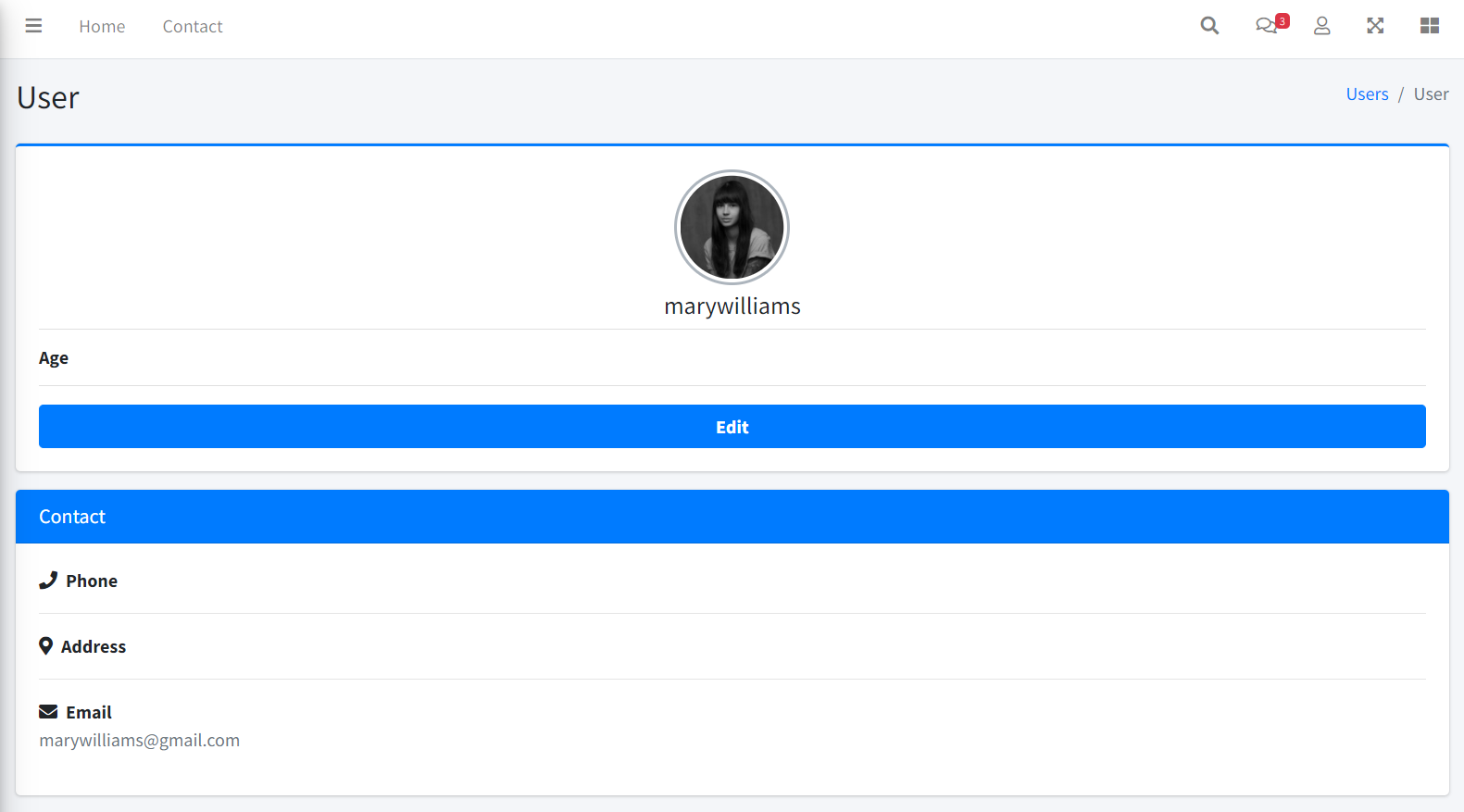
In the view, we have references to fields such as age, phone and address, which are not present in the users table. Normally, these will reside in a profiles table, with a 1 to 1 relationship to the users table. We could also add the corresponding fields to the employees table, since that table already has a user_id.
I’ll leave to you the task of implementing this functionality.
Checking Admin role
Add the following method to the UserController:
public function checkRole()
{
  session_id(APP_SESSION_ID);
  session_start();
  $this->db = new db(CONFIG);

  $user = $this->db->query("SELECT role_name
    FROM users
    LEFT JOIN roles ON users.role_id = roles.id
    WHERE username = '".$_SESSION['username']."'");

  $role = $user[0]['role_name'];

  if ($role != 'Admin') {
    $response = new Response();
    $response->setResponseHeader(404, 'Not found');
  }
}
Of course we need to add this use sentence:
use SimpleMVC\core\Response as Response;
With this method in place, we can add the following line in the index, add, edit, and delete methods:
$this->checkRole();
We have limited the access to those methods to the Admin role. This is a very simple implementation of role based access control, but you can easily extend it.
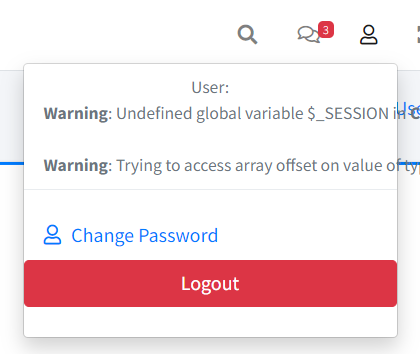
One last thing regarding our view method, is that, although we won’t be checking for an Admin role, we need to access the session variables Otherwise, if we access to the user menu we’ll see the error shown in figure 73:
To avoid this, first we need to add this use sentence:
use SimpleMVC\helpers\SessionChecker as SessionChecker;
And then we can include the call to the check method as the first line of the view method:
SessionChecker::check();
That’ll take care of the issue.
Change password functionality
The change password functionality is very similar to the edit functionality, but the form will only show the password and confirm_password fields. But first let’s define the change method:
public function change()
{
  session_start();
  $this->db = new db(CONFIG);

  $user = $this->db->query("SELECT id
    FROM users
    WHERE username = '".$_SESSION['username']."'");

  $id = $user[0]['id'];

  if ($_SERVER["REQUEST_METHOD"] == 'POST') {
    if (!empty($_POST["password"])) {
      $data = [
        'password'
        => password_hash($_POST["password"],
        PASSWORD_BCRYPT)
      ];


      if ($_POST["password"]
      != $_POST["confirm_password"]) {
        $msg = "Password and Confirmed Password
        doesn't match";
        $this->user->load($data);
        $this->view->setAction('change');
        $this->view->set('user', $this->user);
        $this->view->set('msg', $msg);
        $this->view->render();
        exit;
      }
    } else {
      $msg = "Password is required";
      $this->view->setAction('change');
      $this->view->set('user', $this->user);
      $this->view->set('msg', $msg);
      $this->view->render();
      exit;
    }

    $this->user->load($data);
    $this->user->save($id);

    header('Location: ' . SITE_BASE . 'user/index/');
    exit;
  }

  $this->user->loadModel($id);
  $this->view->setAction('change');
  $this->view->set('user', $this->user);
  $this->view->render();
}
And here is the gist
We get the user id from the database using the username stored in the session, we verify that the password is present and that the confirm_password matches.
For the view, add a change.php file inside the users folder with the following content:
<?php
  $action = 'Change password';
  include '_user_header.php';
?>
<section class="content">
  <div class="container-fluid">
    <div class="card">
      <div class="card-body">
        <form action="<?= SITE_BASE ?>user/change"
        method="POST">
          <div class="form-group">
            <label for="password">Password:</label>
            <input type="password" name="password"
            class="form-control" value="" required>
          </div>
          <div class="form-group">
            <label for="confirm_password">
            Confirm Password:</label>
            <input type="password"
            name="confirm_password"
            class="form-control" value="" required>
          </div>
          <?php if (isset($msg)): ?>
          <div class="alert alert-danger">
          <?= $msg ?></div>
          <?php endif; ?>
          <button type="submit"
          class="btn btn-primary btn-block">
          Save
          </button>
        </form>
      </div>
    </div>
  </div>
</section>
Summary and last words
We are a step closer to having a working application. Still, some things are missing:
Change password functionality, user profile, a dashboard and a sidebar. Those things, my dear reader, I will also leave it to you.
The purpose of the book was to give you valuable knowledge about the inner workings of professional frameworks, developing in the process, one that is completely functional. Hopefully that goal has been reached. Now you are well prepared to work with pure php, or learn any modern framework and be productive.
I wish you the best.